
User Guide
User GuideProduct principles
Protect sensitive information while keeping documents useful for reading and analysis.
Detection, review, redaction and alias restoration run offline on your computer. Original documents, project records and alias mappings are stored only on your computer.
Redact selected sensitive content at the content level by processing the corresponding text layers and image pixels.
Adjust what to redact, the scope and the redaction mode for the intended use, while keeping the material useful for analysis.
Consistent aliases preserve relationships between people and organizations so redacted documents remain useful for reading, collaboration and AI analysis.
Automated detection handles repetitive work. You can review matches, mark missed content, remove annotations or adjust their boundaries to decide what gets redacted.
Quick start
- 01
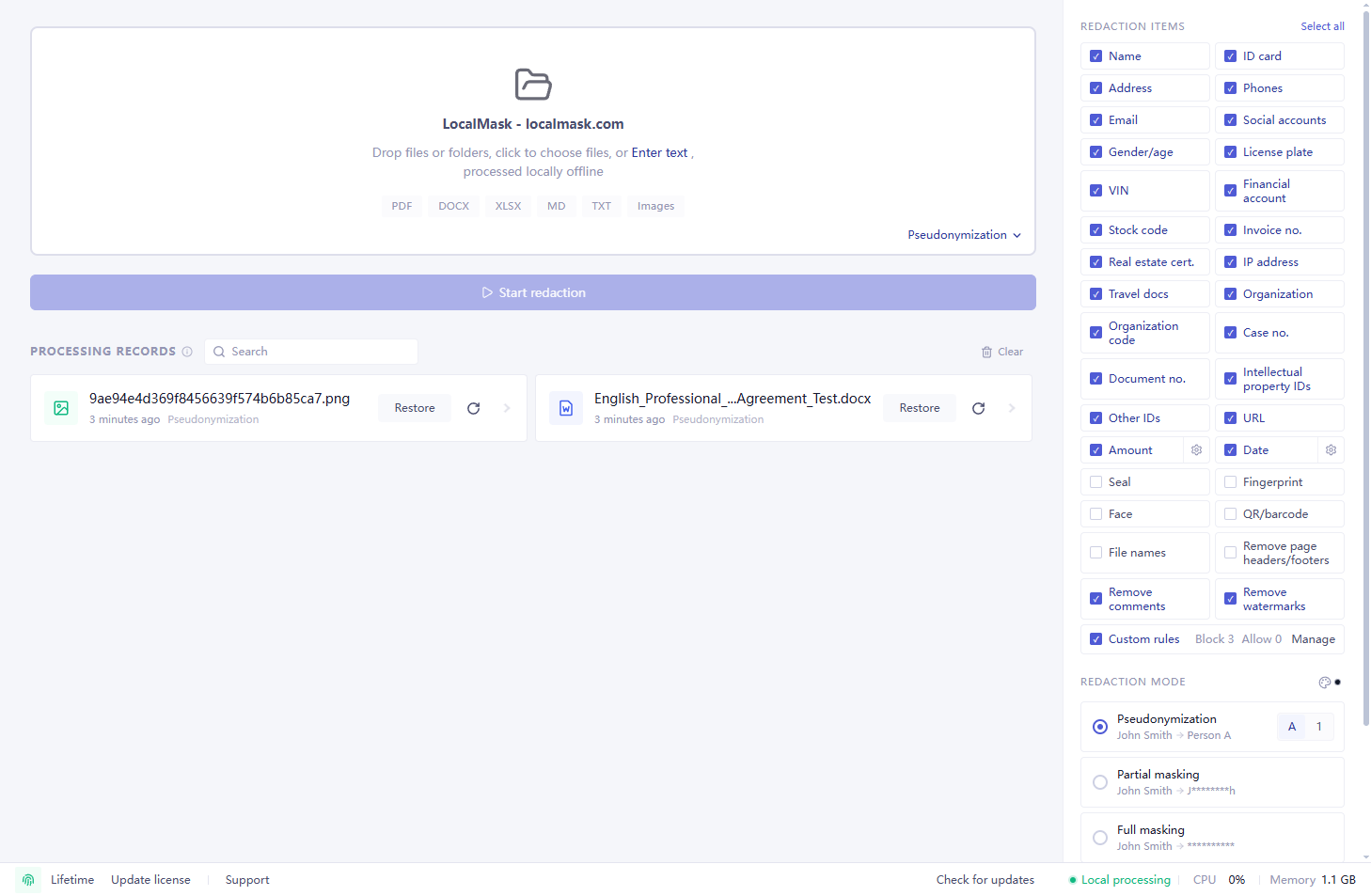
Select the files or folders to process. Batch import is supported.
- 02
Choose the sensitive information types to detect and the redaction mode.
- 03
Click “Start Redaction” and wait for detection to finish.
- 04
Check the detected results. Add or remove annotations, or adjust their ranges as needed.
- 05
Choose an export format and save the redacted copies.
- 06
When working with AI, use Alias Restore to replace aliases in text or files returned by AI or another external system with the original information.
Supported materials
The following are common examples, not an exhaustive list.
Case files, reports, archives, supporting evidence, tender documents, bids, image-only PDFs and scanned PDFs.
Contracts, letters, tender documents, bids, procurement files, manuals, submissions and meeting minutes.
Reports, training slides and project presentations. Imported slides are converted to PDF for review; redacted exports are PDFs.
Payroll sheets, customer and supplier lists, quotation tables, procurement ledgers, financial spreadsheets, operational ledgers and statistical data.
CAD drawings containing recognizable text.
Photos of documents and credentials, screenshots, chat screenshots and scanned images.
Plain-text material, edited drafts, prompts and notes.
Detection accuracy and evaluation criteria
LocalMask continuously evaluates its core Chinese entity recognition model and improves it using performance observed across real-world materials. The results below are from the current production model's latest formal evaluation, completed on July 30, 2026. Evaluation data is strictly separated from training data.
Strict entity-level F1 Combines precision and recall. A prediction is correct only when both the entity type and its exact boundaries match.
Sensitive-information coverage Measures the proportion of sensitive characters covered by detection. It is not the same as entity-level recall.
We will continue expanding real-world evaluations, improving the model, and updating these public metrics after production model releases.
Sensitive information coverage
LocalMask covers many common types of sensitive information and supports custom rules for business-specific material.
Names, Chinese national ID numbers, US SSNs, addresses, travel document numbers, phone numbers, emails, URLs, social accounts, ethnicity, gender, age, postal codes, vehicle plates, VINs, IP addresses and MAC addresses.
Organization names, Unified Social Credit Codes, DUNS numbers, patent agency codes, judicial case numbers and official document numbers.
Patent numbers, patent application publication numbers, invention patent grant publication numbers, utility model grant publication numbers, design patent grant publication numbers, work registration numbers, software copyright registration numbers and software copyright certificate numbers.
Contract, medical record, visit, admission, and other reference numbers.
Bank accounts, IBANs, card numbers, stock codes, invoice numbers, property certificate numbers, amounts and dates.
Handwritten signatures, seals, fingerprints, faces and QR codes.
Redact file names, folder names and Excel worksheet names; optionally remove Word headers and footers, common PDF watermarks, and Word / PDF comments and annotations.
Supports text, spreadsheet and visual rules; text rules can also specify replacement aliases.
Redaction scope settings
Organization names and official document numbers have independent redaction scope settings.
Choose to redact all public authority names, leave public authority names in cited public-authority documents unredacted, or leave all public authority names unredacted. This setting does not affect companies, commercial banks, schools, hospitals, or other organizations.
Choose to redact all official document numbers or leave the official document numbers of cited public-authority documents unredacted.
Redaction modes
Before starting redaction, click the current mode name, such as “Pseudonymization”, at the bottom left of the file area on the home screen. Choose Pseudonymization, Partial masking, Full masking or Erase from the menu. You can also select a mode in the Redaction mode section on the right.
LocalMask provides four common redaction output methods, plus date shifting and amount transformation.
Sensitive content in text is redacted according to the selected mode.
Image content such as seals, handwritten signatures, fingerprints, faces and QR codes is redacted at the pixel level. On export, the original pixels in the redaction area are removed, then the area is filled with your selected redaction color. Seals can also be erased.
The system automatically assigns aliases such as Person A, Person 1, Company A or Company 1 to sensitive content, and custom rules can specify replacement aliases. Pseudonymization preserves relationships among people, organizations and addresses and can automatically associate recognized names of the same organization, such as abbreviations and former names, so they are not mistaken for separate entities after redaction. Matching sensitive content uses the same alias across files in a project, including files added later. Before starting file processing on the home screen, you can choose to reuse aliases and custom rules from a previous project, or import an alias table to reuse its aliases.
Mask the full detected value when exported material should not expose readable source text.
Remove the detected content while preserving its original position and the rhythm of the layout, producing an effect closer to manual blanking.
Keep a few characters for manual review based on the information type and mask the rest. SSNs retain only the last four digits.
Apply a uniform date shift forward or backward by days, months or years to redact dates while preserving chronological order.
Apply addition, subtraction, multiplication or division consistently to preserve scale and calculation semantics while reducing exposure of actual amounts.
Seal redaction
Open the settings next to Seals to choose one of three processing methods.
Redact the entire seal at the pixel level and fill it with the selected redaction color.
Redact the text inside the seal while keeping its border and graphics.
Erase the seal while preserving overlapping text.
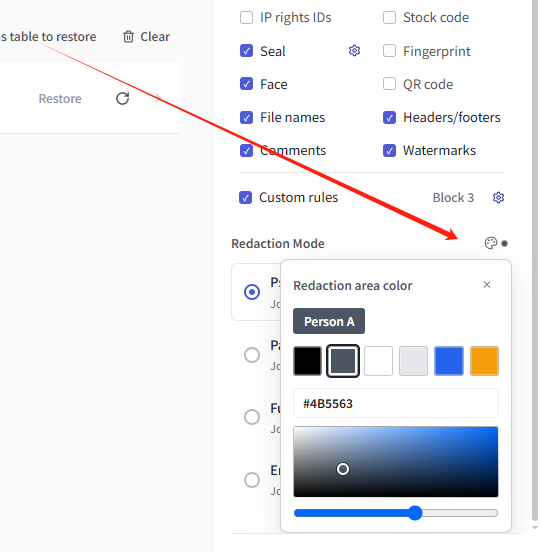
Set redaction area color
Customize the redaction area color in previews and exported copies. Erase defaults to white; other modes default to a dark color.
On the home screen, click the palette icon next to “Redaction mode”. Choose a preset, use the color picker, or enter a hexadecimal color value.
Custom rule engine
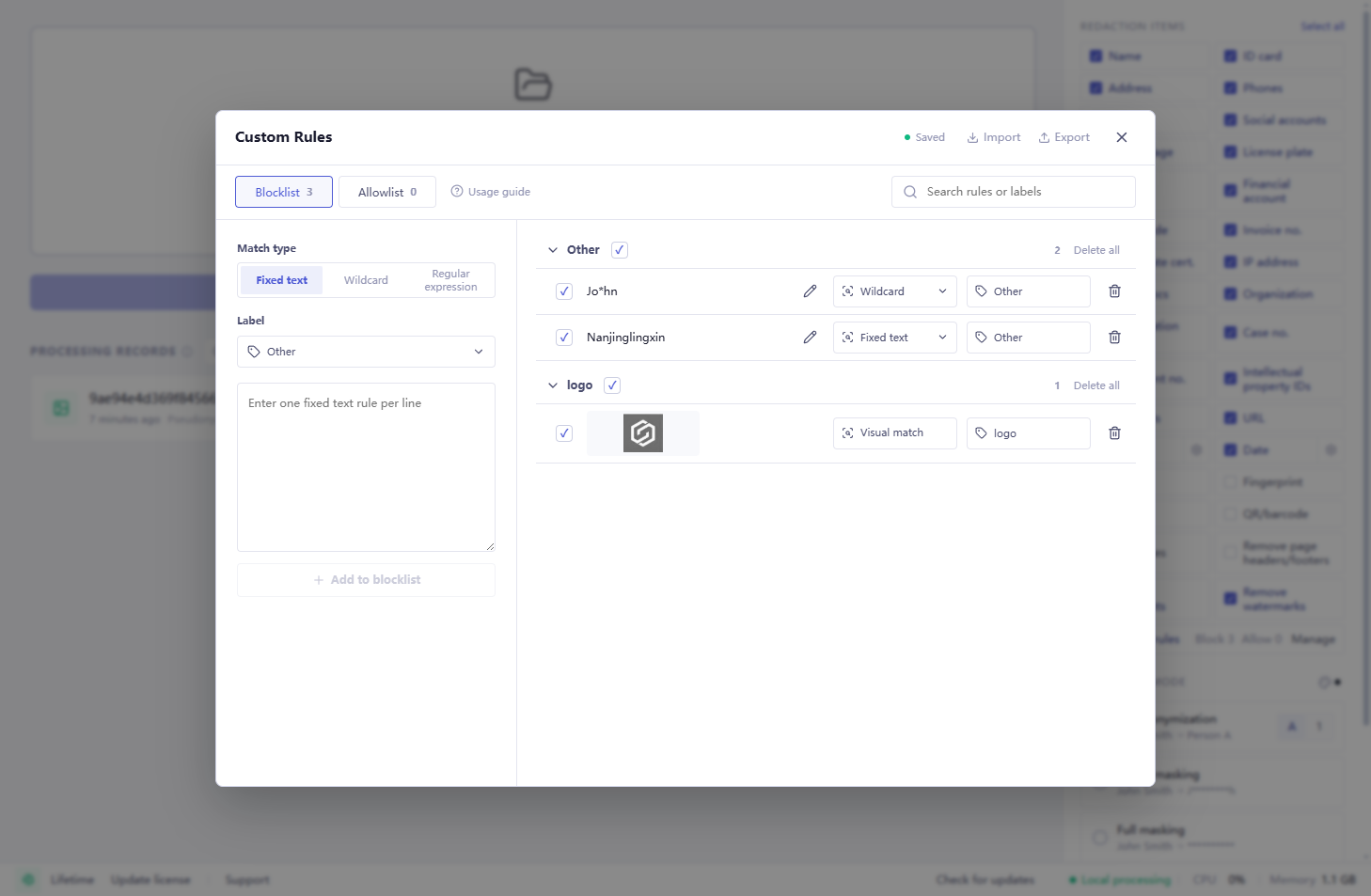
The software automatically detects most common sensitive information; custom rules supplement matching for specific content.
Custom rules stay on the local computer. Configure commonly used rules on the home screen, or adjust rules independently within each project.
Rule types, blocklists and allowlists
Content matching a blocklist rule is redacted; content matching an allowlist rule is not redacted. When rules overlap, the rule with the more specific matching scope takes precedence. With the same scope, the allowlist takes precedence. Text rules apply to all supported file types and can specify replacement aliases. Spreadsheet rules apply only to Excel / CSV and can match cell content, restrict matching by header, or match whole columns. Rules can be imported or exported through Excel. Add a selected logo, icon or other distinctive graphic to the blocklist to automatically match and redact it in future files.
Match fixed content such as customer names, project codes, internal abbreviations and public names, and specify replacement aliases for sensitive content.
Use * to match variable content.
Match content by format, with lookarounds to constrain matches based on surrounding text.
Apply only to Excel / CSV. Match cell content, restrict matching by header, or match whole columns. Content and headers each support fixed text, wildcards and regular expressions.
Add a selected logo, icon or other distinctive graphic to the blocklist to automatically match and redact it in future files.
Excel rule file instructions
| Field | Instructions | Example |
|---|---|---|
| Blocklist / Allowlist | Content matching a blocklist rule is redacted. Content matching an allowlist rule is not redacted. When rules overlap, the rule with the more specific matching scope takes precedence. With the same scope, the allowlist takes precedence. | Blocklist: John Smith Allowlist: a public organization name |
| Rule | Enter the text or expression to match. With a header specified, an empty Rule matches the whole column. | John Smith |
| Match type: Fixed text | Match the text entered in the rule. | Acme Ltd → matches Acme Ltd |
| Match type: Wildcard | Use * to match any content between fixed text. Include fixed text on both sides of *. | Acme*Ltd → matches Acme Trading Ltd |
| Match type: Regex | Match text to redact by its format. Positive and negative lookahead and lookbehind (lookaround) can restrict matches based on surrounding text. The expression must match actual text, not just a position. Do not wrap it in /. Recursion, subroutines, match-start resets and backtracking control verbs are not supported. | Expression: (?<=ID: )ABC-\d{6} Original: ID: ABC-123456 Redacted content: ABC-123456; ID: is not redacted |
| Label | Enter a system label or custom label to categorize content. In Pseudonymization mode, aliases are assigned automatically from the label when no fixed alias is specified. | Name → [Person A] Organization → [Company A] Physician → [Physician A] |
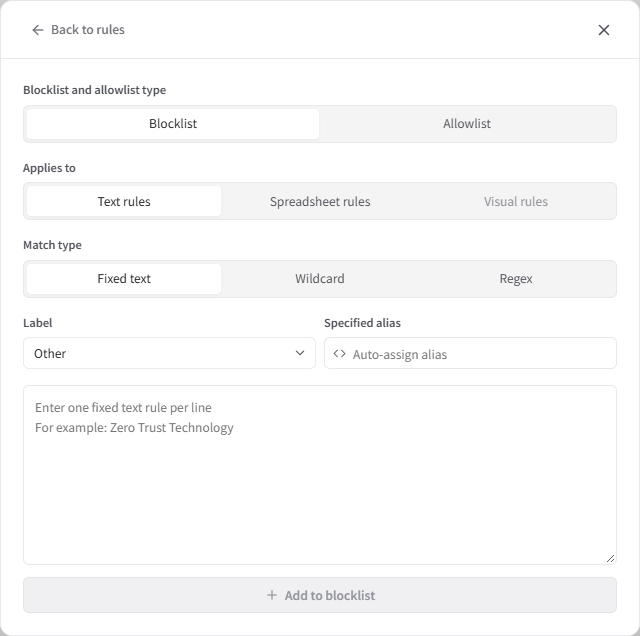
| Fixed alias | Fixed-text blocklist rules that match content, and visual blocklist rules, support fixed aliases. The specified alias is used for redaction. For fixed-text rules, choose Text rules or Spreadsheet rules in Applies to. Use a distinct alias for each fixed text. To use the same base alias for different content, enter 'Company A', 'Company A Alias', 'Company A Alias 2', and so on for the respective rules. If you do not want alias suffixes to appear in exported redacted files, select 'Hide alias suffixes' when exporting. 'Company A Alias' and 'Company A Alias 2' will both appear as 'Company A'. | Rule → Fixed alias Acme Limited → Company A Acme Ltd → Company A Alias Acme → Company A Alias 2 |
| Applies to: Text rules | Applies to all supported file types, including spreadsheets. An empty value means Text rules. | |
| Applies to: Spreadsheet rules | Applies only to Excel / CSV. Rules with a header are treated as Spreadsheet rules. | Rule: Internal project code Applies to: Spreadsheet rules |
| Header | Enter a column name or expression to match the entire header cell. With content in Rule, match content in the data rows of those columns. An empty Rule matches whole columns: blocklists redact them, while allowlists exclude them from redaction. An empty Header leaves content matching unrestricted by column. | Header: Company name Rule: Acme*Ltd Match type: Wildcard → matches Acme Trading Ltd in the Company name column |
| Header match type | Enter Fixed text, Wildcard or Regex; empty means Fixed text. Leave both Header and Header match type empty when no header condition is needed. | Header: Client*Address Header match type: Wildcard |
| Applies to: Visual rules | Add visual rules in the app, then export them. Each visual row in Blocklist contains an image and uses Visual match and Visual rules. Enter its alias in Fixed alias; leaving it blank displays no alias. Manage image content in the app. | |
| Rule settings: Header search rows | Enter an integer from 1 to 100 in Rule settings. Each worksheet searches its first N rows independently. | 10 → search the first 10 rows of each worksheet |
| Enabled | Optional. Rules are enabled when this column is omitted or the cell is blank. Enter Disabled to disable a rule. | Enabled / Disabled |
Fixed aliases and automatic assignment
In Pseudonymization mode, use labels and Fixed alias to set what appears in the redacted content.
Leave Fixed alias blank to assign aliases automatically from the label. For example, the label Physician produces aliases such as Physician A and Physician B.
Enter the alias you want to use in Fixed alias. It appears in place of the matched content after redaction. To use the same base alias for different content, enter Company A, Company A Alias, Company A Alias 2, and so on for the respective rules.
If you do not want alias suffixes to appear in exported redacted files, select Hide alias suffixes when exporting. Company A Alias and Company A Alias 2 will both appear as Company A.
For example, add fixed-text rules under Blocklist in Custom Rules. Give John and Mary the label Physician and leave Fixed alias blank to display them as [Physician A] and [Physician B]. Give David the label Director to display him as [Director A]. To display a name as [Project lead], enter Project lead in that rule’s Fixed alias field.
Download the alias rule example template (Excel, Chinese) for examples of automatic assignment from labels and fixed aliases. Replace the sample entries with your own, then import the file in Custom Rules.
After processing, edit labels or aliases in the review workspace, or adjust them together in the project’s Alias Table. Review the results, then export. Export files again to include changes made after an earlier export.
Write regular expressions with AI
Copy the prompt below into an AI tool and answer its questions with fictional or already-redacted examples. Do not send real sensitive information.
I need a regular expression for text matching. First ask me for several examples, then ask step by step which parts remain fixed, which parts vary, the character types and lengths of the variable parts, and which part of each example should ultimately be matched. If the information is incomplete, keep asking questions instead of making assumptions.

Once the requirements are clear, generate the expression. It must be ready to paste directly, without /.../ delimiters. Positive and negative lookaheads and lookbehinds are supported to preserve surrounding text. The expression must include a non-empty matching part and should not span lines by default. Do not use subroutines, recursion, match-start resets or backtracking control verbs. Finally, explain the rule, test it against my examples and identify possible false matches.
Share rules with your team
- 01
Open Custom Rules on the home screen, click Export and share the Excel rule file with your team.
- 02
Each member opens Custom Rules on their home screen, clicks Import, selects the Excel file, chooses an import mode and confirms.
- 03
Export and share an updated file when the rules change. Members choose Replace all rules to use the same rules as the file.
When importing custom rules, choose Merge import or Replace all rules. Merge import adds new rules, updates matching rules and keeps other existing rules; Replace all rules keeps only the newly imported rules.
Redact only your company
To redact your own company name and leave other organization names unredacted, configure it as follows:
- 01
Before processing the files, turn off automatic Organization Name detection so other organization names are not marked.
- 02
Open Blocklist under Custom Rules, select Fixed Text and choose Organization Name as the label. To use a consistent business term, specify an alias such as Our Company.
- 03
Enter one actual form per line, such as the full legal name, a commonly used abbreviation, the English name or a brand name.
- 04
After detection, verify in the review workspace that every form of your company name was found and other organizations were not marked.
Spreadsheet rules: match cell content or whole columns
Text rules apply to all supported file types, including spreadsheets. Spreadsheet rules apply only to Excel / CSV. Add them in Custom Rules on the home screen or in Project rules.
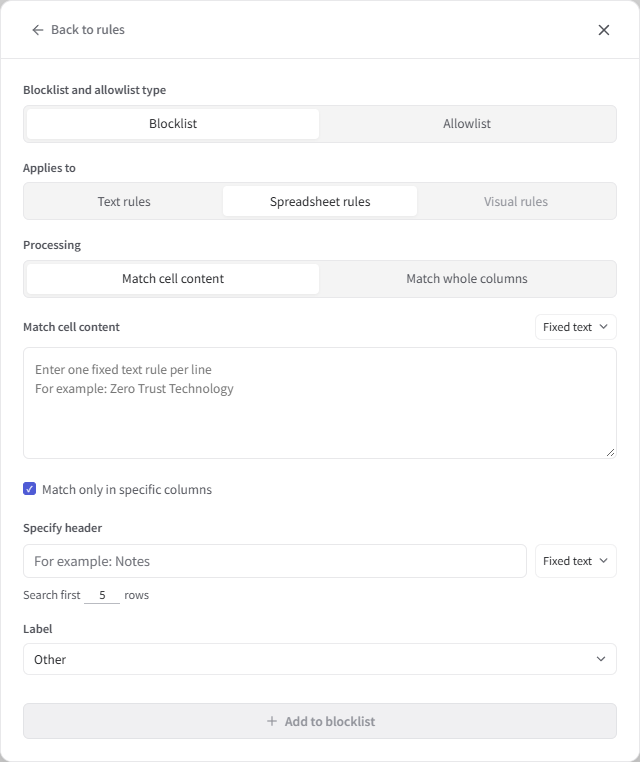
Match cell content
- 01
Add a blocklist or allowlist rule, set Applies to to Spreadsheet rules, and choose Match cell content.
- 02
Choose Fixed text, Wildcard or Regex and enter one content rule per line. Choose the appropriate label for blocklist rules.
- 03
To restrict matching to columns, select Match only in specific columns, enter Specify header and choose its match type. Header and content conditions are configured separately.
For example, to redact an internal project code in spreadsheets, choose Fixed text and enter the code. To match Acme Trading Ltd only in the Company name column, select Match only in specific columns, set the header to Company name, and use the content wildcard Acme*Ltd with the Organization label.
Match whole columns: column redaction and speedup for large Excel / CSV spreadsheets
For large spreadsheets with fixed column names, configure Match whole columns before processing to redact columns directly or skip content recognition, saving recognition time.
- 01
Add a blocklist or allowlist rule, set Applies to to Spreadsheet rules, and choose Match whole columns.
- 02
Enter one column name or expression in Specify header. Choose Fixed text for a fixed name, or Wildcard or Regex for a naming pattern. Choose the appropriate label for blocklist rules, then save.
For example, to redact all names in the Customer name column, choose Blocklist, enter Customer name as the header and select the Name label. Data below the header is redacted directly using that label, skipping content recognition.
To preserve the Product category column, choose Allowlist and enter Product category as the header. Original values are preserved and content recognition is skipped from the header row onward. Unmatched columns continue through automatic recognition. When the same header matches both lists, the allowlist takes precedence.
For multiple financial columns, add rules individually or use the header regex ^(Account|Account code|Account number|Voucher number|Voucher code)$. Headers match the entire cell. If the header falls outside the search range, increase the number of rows searched.
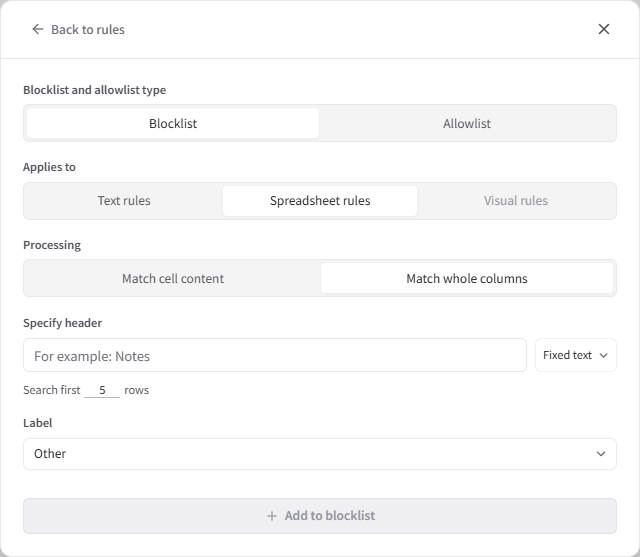
Custom Rules on the home screen configures global rules. Project rules are independent of global rules and other projects. To configure project rules in advance, click New project, configure the rules, then add files. Changes to Match cell content rules in a project apply to existing spreadsheets; changes to Match whole columns rules apply to files added later.
Review workspace
After detection, review the results in the workspace. The document appears on the left and detected content is grouped by category on the right. You can add missed redaction annotations, adjust them or remove them.
Both the file list and hit list support multiple selection: Ctrl-click to select or deselect individual items, or Shift-click to select a range. On macOS, use ⌘ instead of Ctrl. After selecting multiple hits, right-click and choose Remove annotations to remove all annotations associated with those hits.
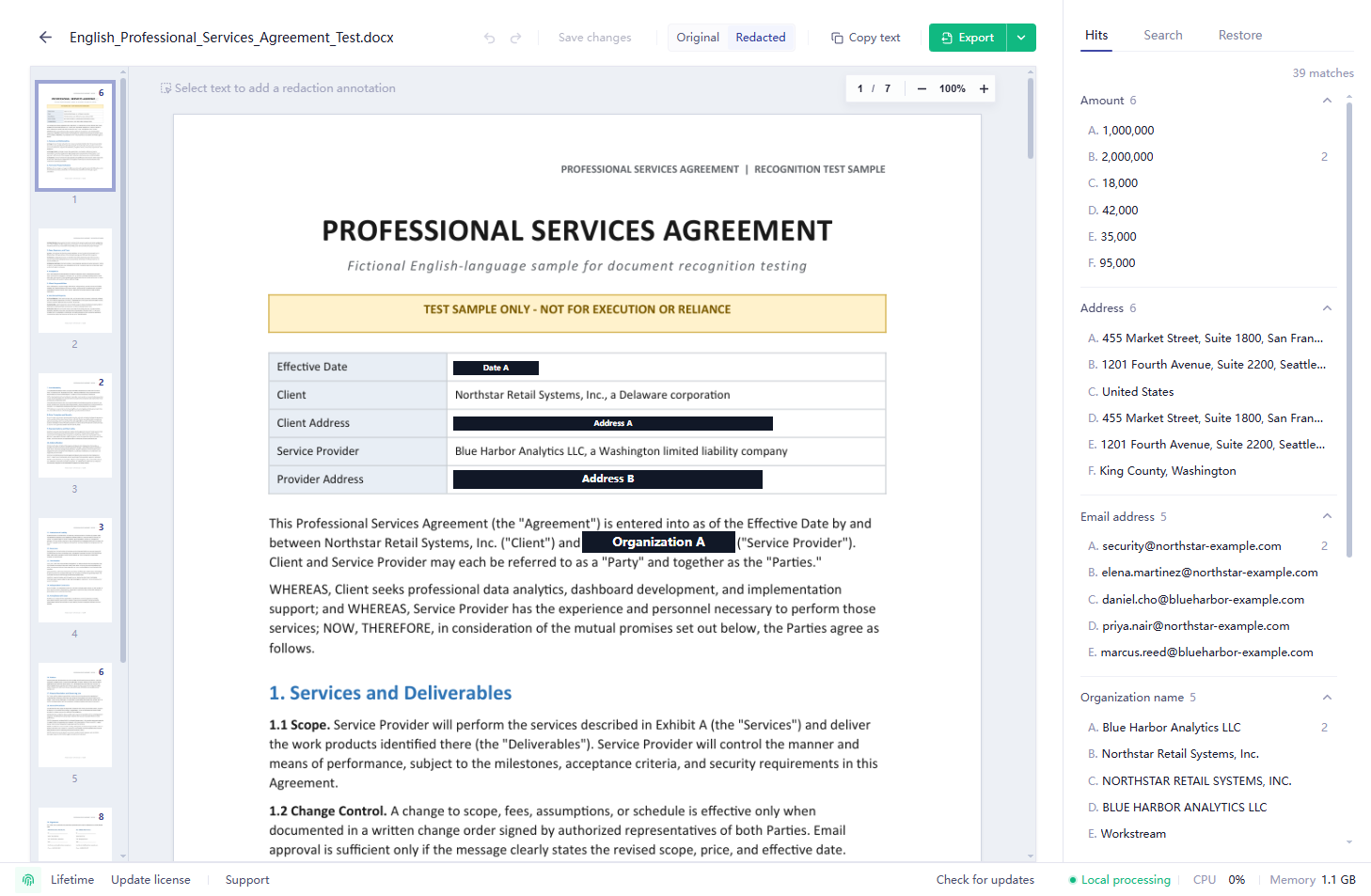
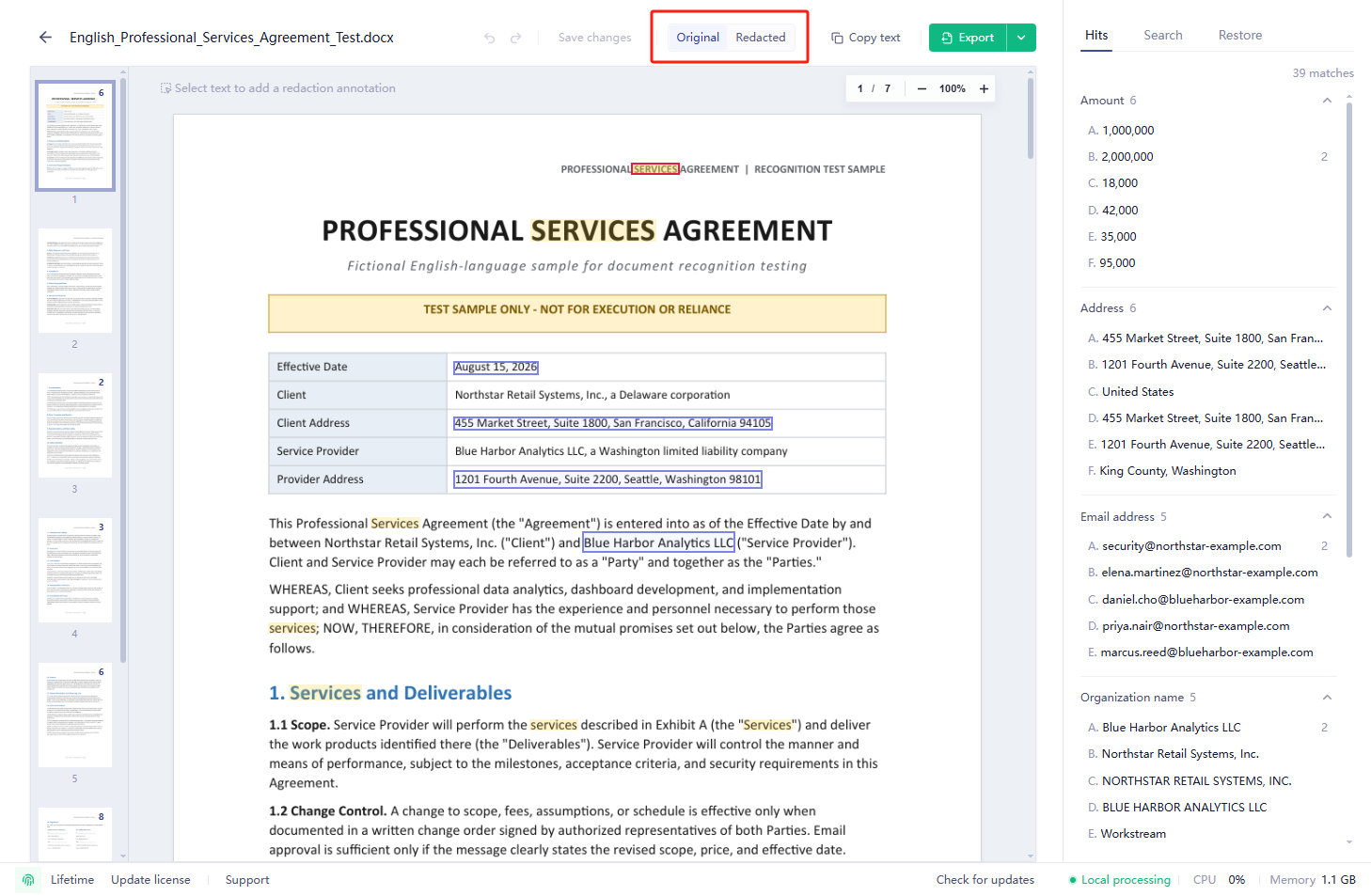
Switch between two views at the top. Original verifies detected locations and source content; Redacted shows the output after pseudonymization, masking or removal.
When you find a missed item during review, select the text or area to add an annotation. For repeated text or the same graphic, batch-mark every match in the current document. Existing annotations can also be relabeled, assigned a different alias or removed.
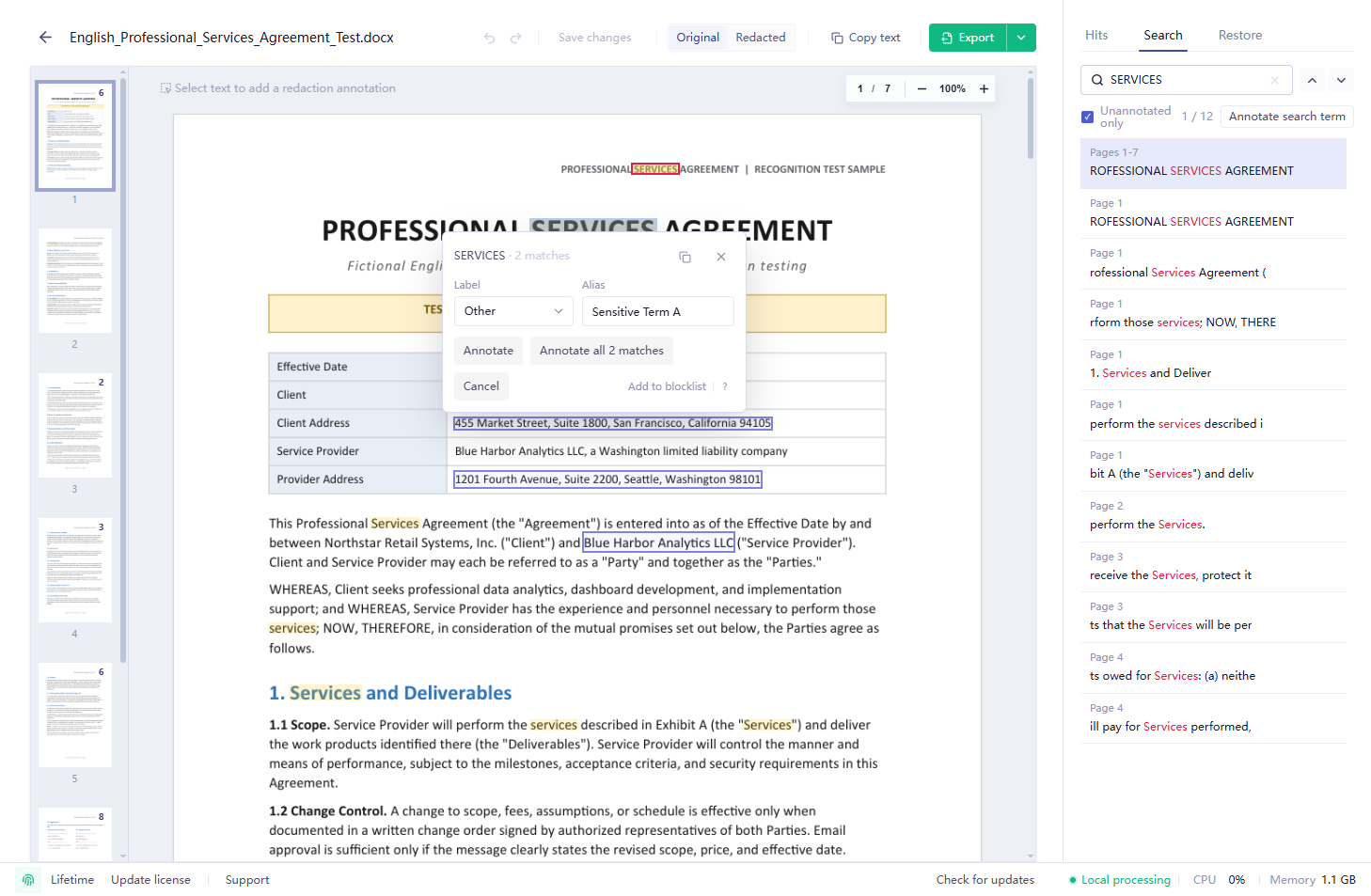
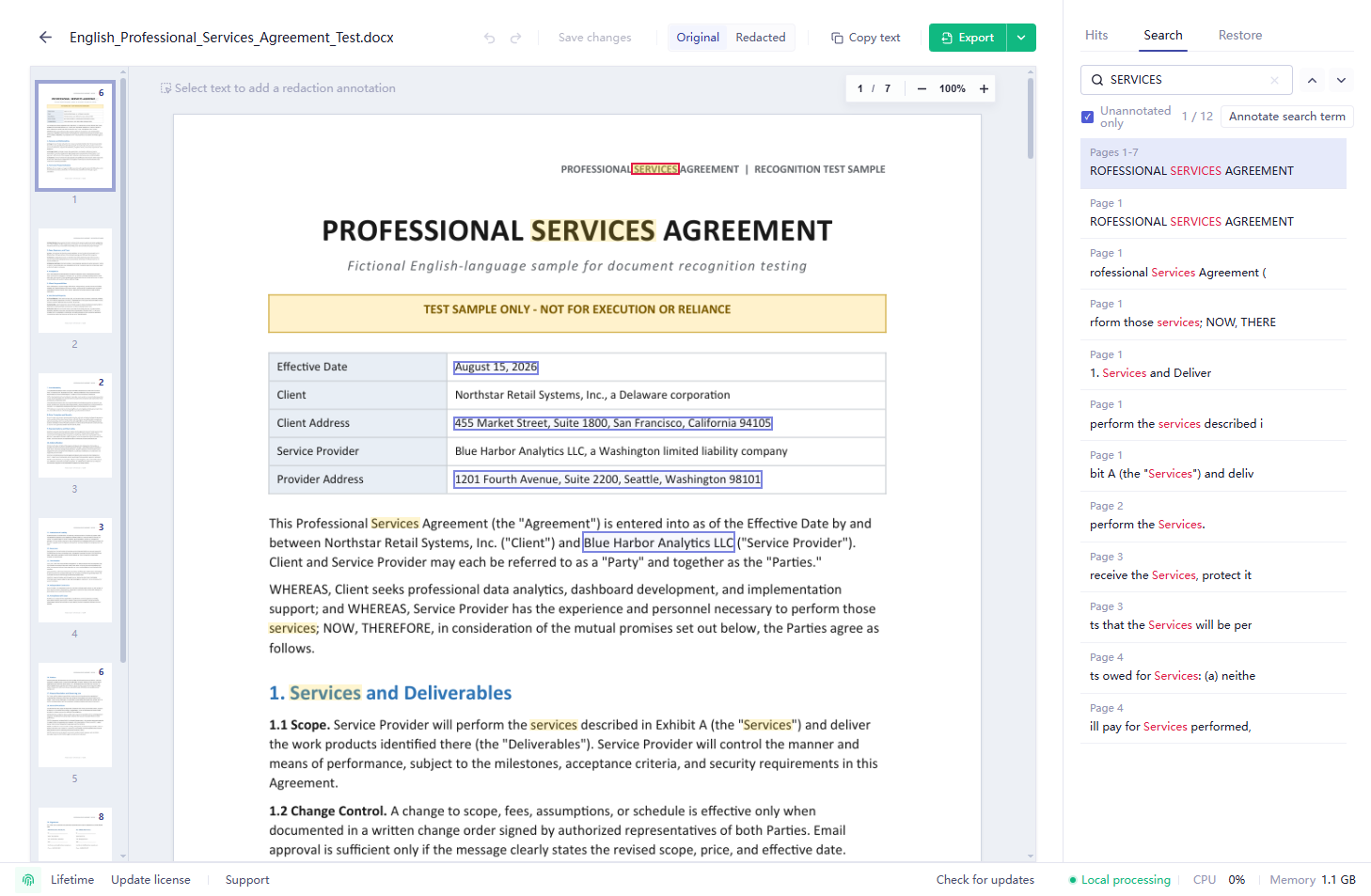
Use the Search tab on the right to find original text and jump to its location. Filter for unredacted content to check names, identifiers and keywords in long documents. Select the page number at the top to jump to a specific page.
Click .* beside the search box to enable regular expression search, with support for lookarounds.
Review the results, click Batch annotate, choose a label and confirm to add annotations in bulk.
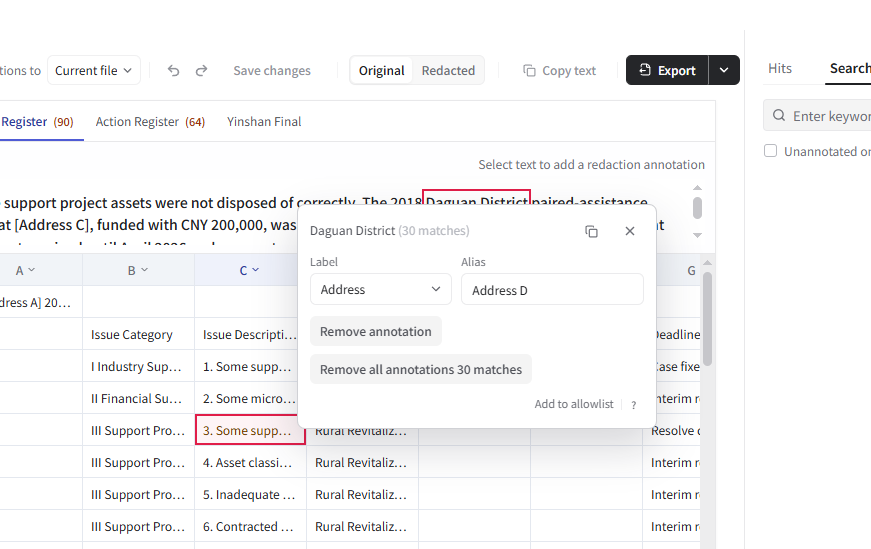
Click a cell and select text in the details above to add an annotation. Use the column menu to redact or ignore an entire column. Search a workbook, worksheet or selected column using keywords or regular expressions, then batch redact matches.
Review and redact Excel spreadsheets
For rules configured before processing to reduce recognition time, see Column redaction and speedup for large Excel / CSV spreadsheets.
Click a cell, select the text to redact in the details above, choose a label and click Annotate.
Click a column letter such as A, B or C to open its menu. Under Label, choose an existing label or enter and create a custom label. Select Redact entire column and confirm. To stop redacting the column’s existing annotations, select Ignore entire column and confirm.
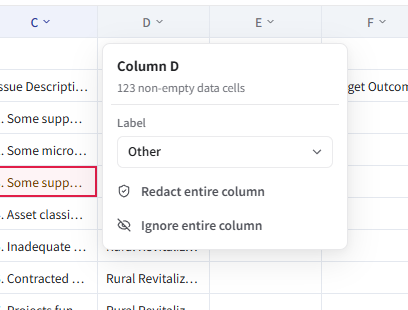
Column actions overwrite the column’s current results and cannot be restored with a single action after confirmation.
Search columns and batch redact matches
Open Search in the right panel. Use the dropdown beside the search field to select Workbook, Sheet or a column such as Column A or Column B. Enter a keyword, or turn on regular expressions to search by pattern. Workbook search covers every sheet in the current file; column search covers all rows in the selected column.
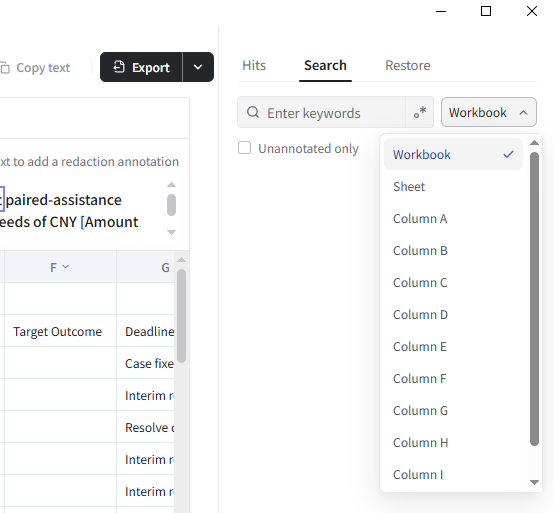
Review the results, click Batch annotate, choose a label and confirm to redact matches using the current mode. Results that already have annotations are skipped. For example, select the Notes column, search for a customer abbreviation and batch redact matches in that column.
Mark logos and other graphics
- 01
Select the logo, icon or other graphic to redact. You can adjust the label or enter an alias if needed.
- 02
Click Annotate region to mark only the selected area. To annotate matching graphics in bulk, click Find similar graphics, then click Annotate all once the search finishes to mark the matches found in the current document.
Click Add to Blocklist to annotate matching graphics in the current document and save a visual rule for automatic matching and redaction in future files.
Built-in project management
Import files on the home screen and start processing to automatically create a project containing all files in that run.
Click Add files or Add folder next to the project name in the left sidebar, or drag materials into the file list below. Search by file name to locate materials, and use the remove button on a file row to remove it from the project.
In Pseudonymization mode, matching sensitive information uses the same alias across project files, including materials added later.
Click Project alias table at the bottom of the left sidebar to view and export alias mappings for all files in the current project.
Click Project rules in the left sidebar to independently manage text, spreadsheet and visual rules for the current project, with Excel import and export. Materials added later continue to use the project’s rules.
Move between materials in the project tree, review them in one workspace and batch-export as needed. Folder imports can retain their original directory structure.
Configure rules specifically for a project in advance
To configure rules specifically for a project before processing, click New project on the home screen, enter a project name and set up Project rules. Then add files or a folder to start redaction. For example, set up Spreadsheet rules → Match whole columns before adding Excel spreadsheets so the files are processed using the project's rules.
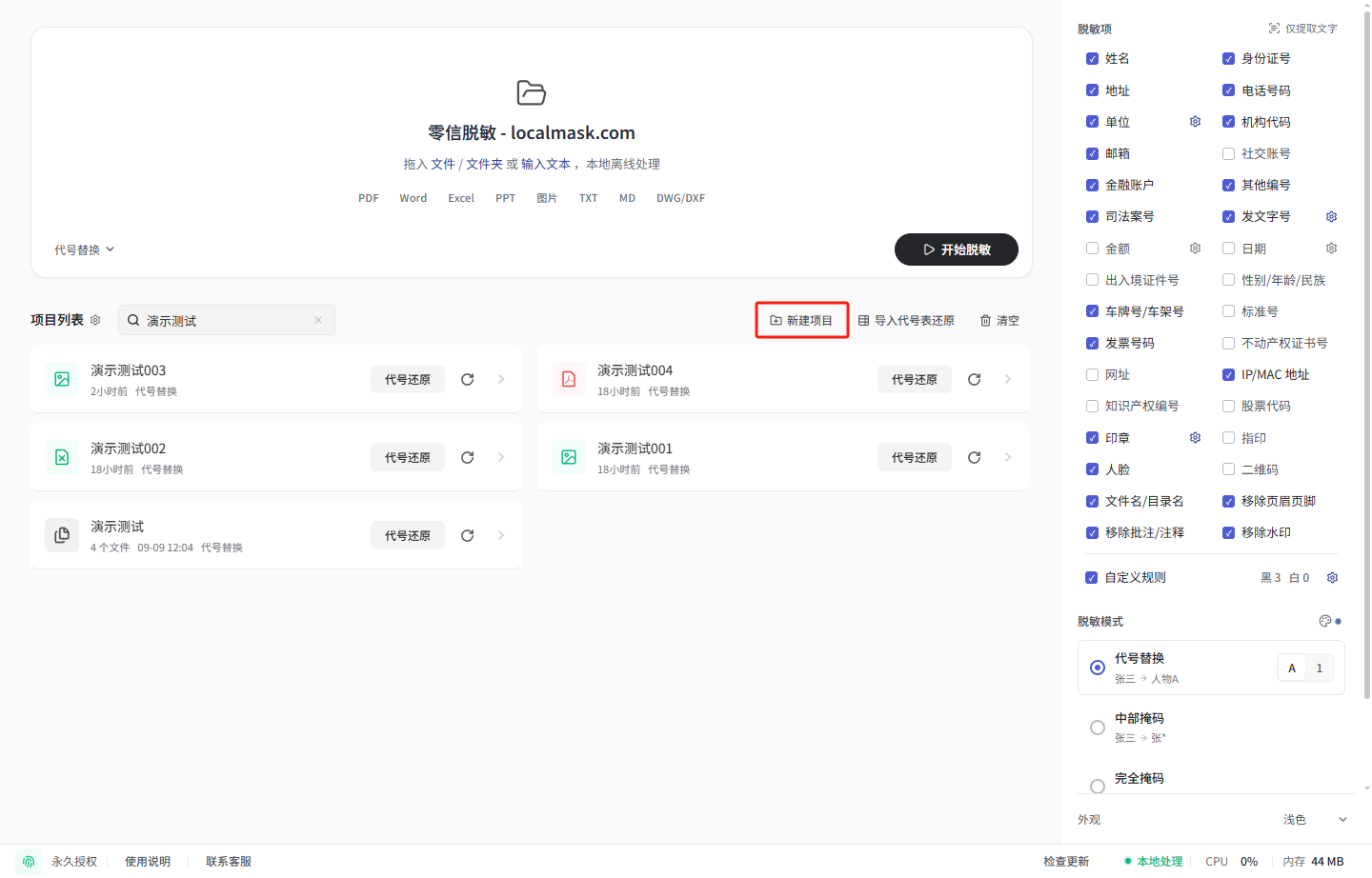
What should I do if different document types need different rules?
A project can contain spreadsheets, Word documents, PDFs and other files with shared aliases. Text rules apply to all supported file types. Spreadsheet rules apply only to Excel / CSV and can match cell content, restrict matching to specified columns, or match whole columns.
For example, choose Spreadsheet rules in Project rules and add a wildcard for the Company name column. This rule applies to spreadsheets in the project; other documents use text rules. See spreadsheet rule steps and examples.
Add subsequent materials to the same project to automatically reuse its rules and aliases. Rules can also be exported and imported for refinement and sharing.
Projects are saved automatically
Results and review state are automatically encrypted and saved in a local project. To continue, open the corresponding project from Projects on the home screen to add more materials, review, adjust and export. In Pseudonymization mode, newly added materials reuse the project’s existing aliases.
Processing results are saved automatically in a local project, with no separate save step.
Open the corresponding project from Projects on the home screen to return to the review workspace and continue.
Detection results, review decisions and alias mappings in the project are encrypted and stored locally.
Project storage settings
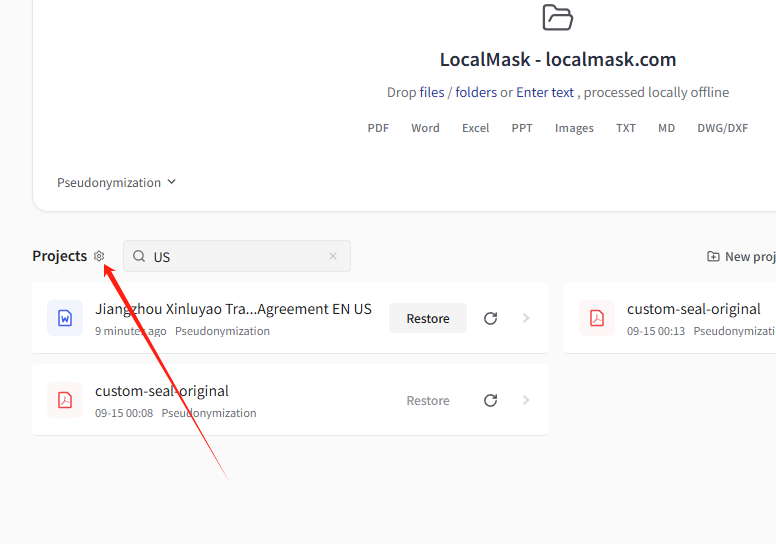
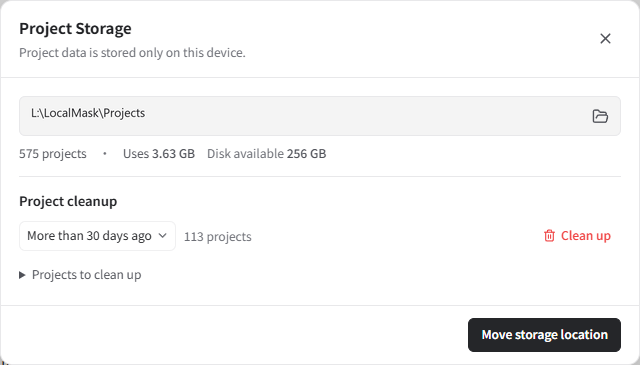
Click the gear next to Projects on the home screen to open Project Storage and view the storage location, project count, project disk usage, available disk space and reclaimable space.
Choose more than 30, 90 or 180 days ago from the dropdown to filter projects by their last update time, or choose All projects to clear every project. The dialog shows the matching count. Expand Projects to clean up to review the list. Click Clean up next to the red trash icon and confirm to delete the selected projects and their file records, annotations and aliases. Deletion cannot be undone. Source files stay unchanged.
Click Free up space to reclaim disk space occupied by deleted data.
Click Move storage location and select an empty folder on a drive with enough space. Review the destination and click Start migration. The app migrates existing projects and restarts, then uses the new storage location.
Export
After review, choose an export format based on the recipient and purpose.
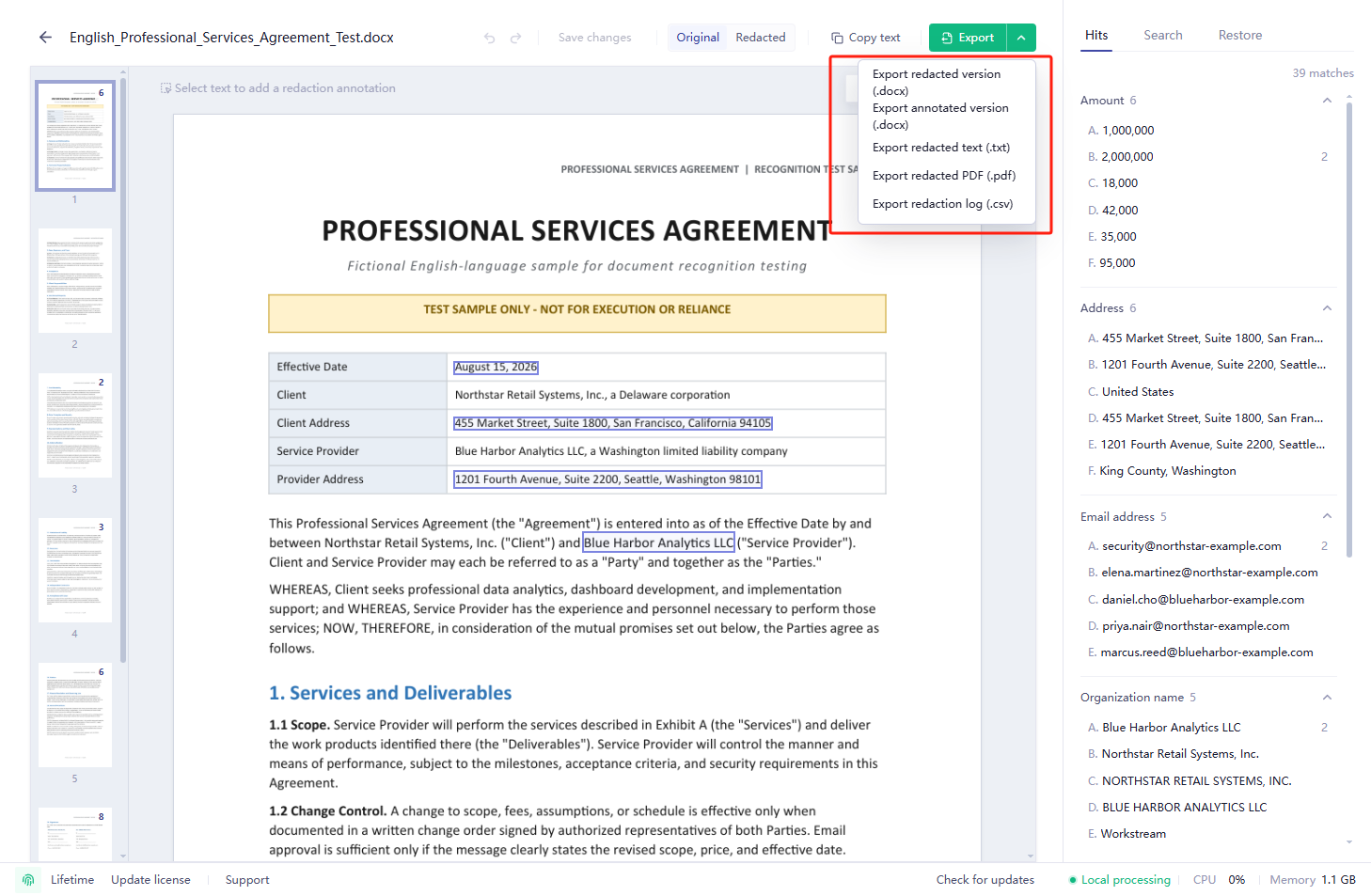
Aims to preserve the main structure and layout for final delivery or continued editing. DOC, WPS and RTF files export as DOCX; XLS, XLSM and ET files export as XLSX. PPT and PPTX presentations export as PDFs.
Exports redacted content as lightweight Markdown for AI analysis or further processing.
Exports a fixed-layout copy for viewing across devices, archiving or external sharing. To reduce the size of a scanned PDF, select high compression during export for easier uploading and sharing.
Export PDFs, scanned PDFs or images as Word documents, with formatting based on the original page layout.
Shows detected locations with highlights and comments for internal review. It still contains sensitive source text and is not suitable as an externally shared redacted result.
Exports only the processed text without the original layout, suitable for AI and text-processing workflows.
Includes categories, sensitive source text, aliases and occurrence counts.
In other redaction modes, summarizes categories, sensitive source text, redacted results and occurrence counts for internal verification and records. Store it securely.
Select Export all in the bottom-left corner of the review workspace to export all completed files in the project at once. The menu supports original-format or Markdown exports, original-format or Markdown ZIP archives, and a separate project alias table or hit table. Files imported from a folder retain their original directory hierarchy.
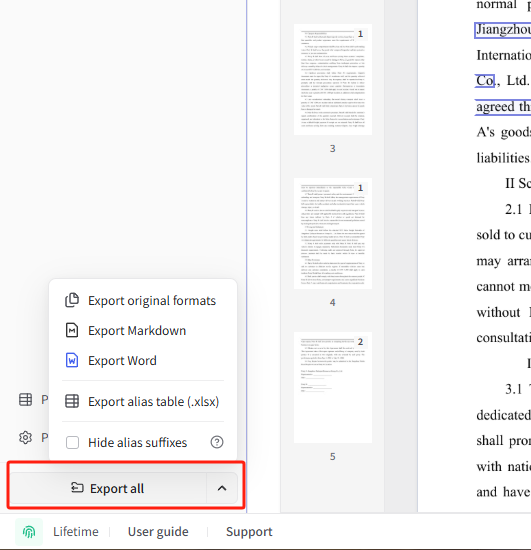
To export selected files, Ctrl-click individual files or Shift-click a range in the file list, then right-click to export in the original format, as Markdown, or as a ZIP archive. On macOS, use ⌘ instead of Ctrl.
Pseudonymization and restoration
The system automatically assigns aliases such as Person A, Person 1, Company A or Company 1 to sensitive content, and custom rules can specify replacement aliases. These aliases pseudonymize sensitive information while preserving relationships among people, organizations and addresses. Pseudonymization can automatically associate recognized names of the same organization, such as abbreviations and former names, so they are not mistaken for separate entities after redaction. Matching sensitive content uses the same alias across files in a project, including files added later. Before starting file processing on the home screen, you can choose to reuse aliases and custom rules from a previous project, or import an alias table to reuse its aliases.
Select “Hide alias suffixes” in the export menu or format dialog to display [Organization A Alias] and [Organization A Alias 2] as [Organization A] for easier reading and AI analysis. Keep the suffixes if you need to restore each variant to its original name later.
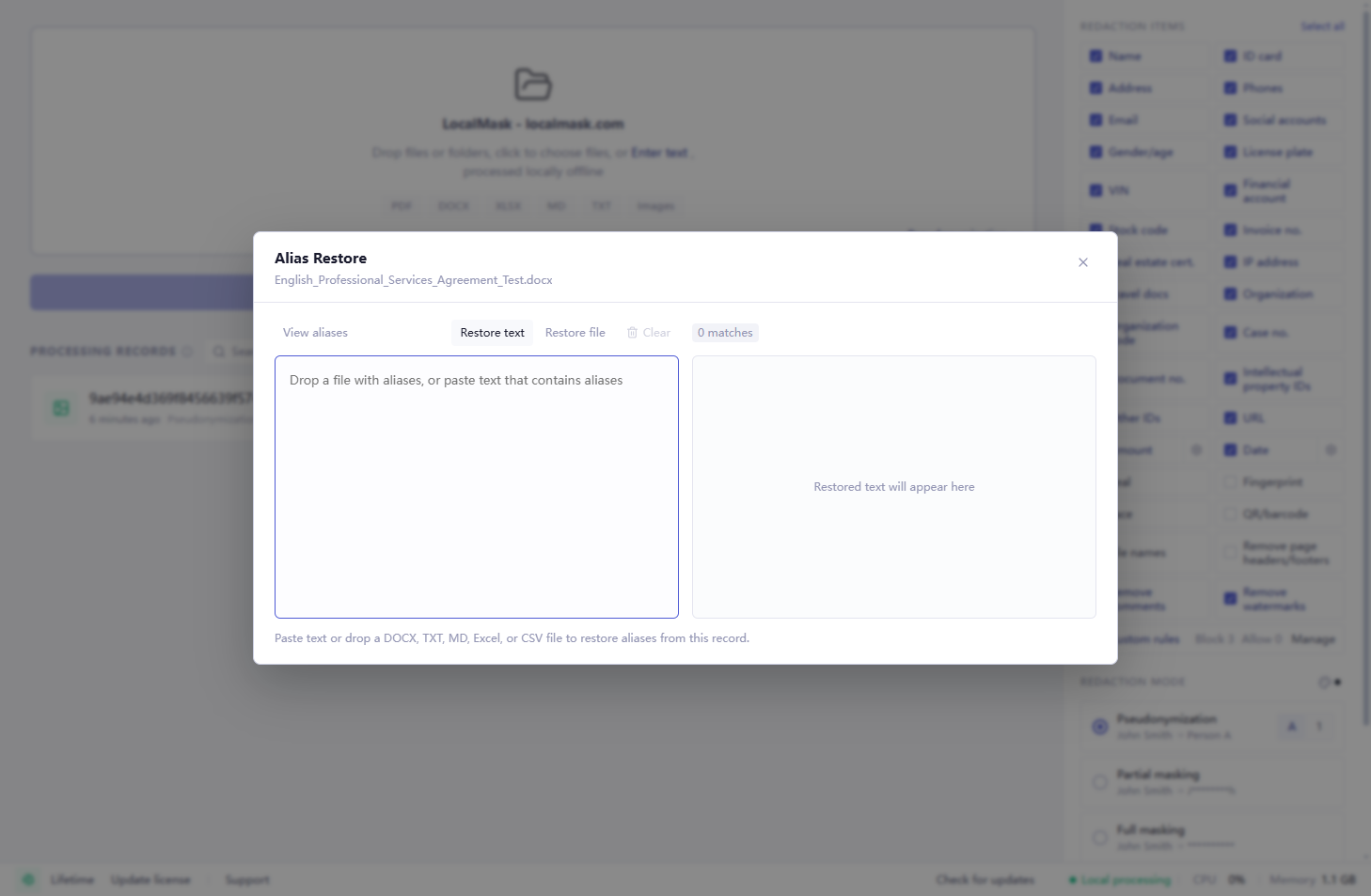
Alias restoration uses the mappings created during redaction to restore aliases in content returned by AI or another external service to their original information. Rewritten documents, newly generated reports and text can all be restored using the original project or its corresponding alias table. Alias mappings and restoration remain on the local computer. Word documents returned with tracked changes or comments can retain them while restoring aliases, original headers, footers, logos and watermarks.
Ask AI to preserve each alias and its brackets exactly when analyzing or rewriting documents.
Choose one of these three entry points based on the source of your material:
- From the home screen: Find the project originally used to redact the material and click its Alias Restore button.
- From the document review screen: Open the project originally used to redact the material, then switch to the Alias Restore tab on the right.
- Import an alias table: If the project has been deleted but you kept its exported alias table, or a colleague has shared redacted material with its matching alias table, click Import alias table to restore on the home screen and import the corresponding XLSX table.
- 01
In the restoration dialog or panel, click Select File or drag in the file returned by AI. Supported formats include DOCX, TXT, Markdown, Excel and CSV. To restore text, click Paste Text and paste the content.
- 02
Choose a save location for the restored file, or copy the restored text. Review the result before using it.
Appearance settings
On the app home screen, find “Appearance” at the bottom of the right sidebar. Click the current option and choose “System”, “Light” or “Dark”. In the review workspace, use “Appearance” in the bottom status bar.
The default is “System”, which follows your computer’s light or dark theme. “Light” and “Dark” keep the selected appearance. Your choice is saved on this computer and applied the next time you open the app. Appearance changes the interface colors; documents and images retain their original colors.
Performance settings
LocalMask optimizes local processing across platforms and device configurations. Some devices can also enable hardware acceleration for faster processing.
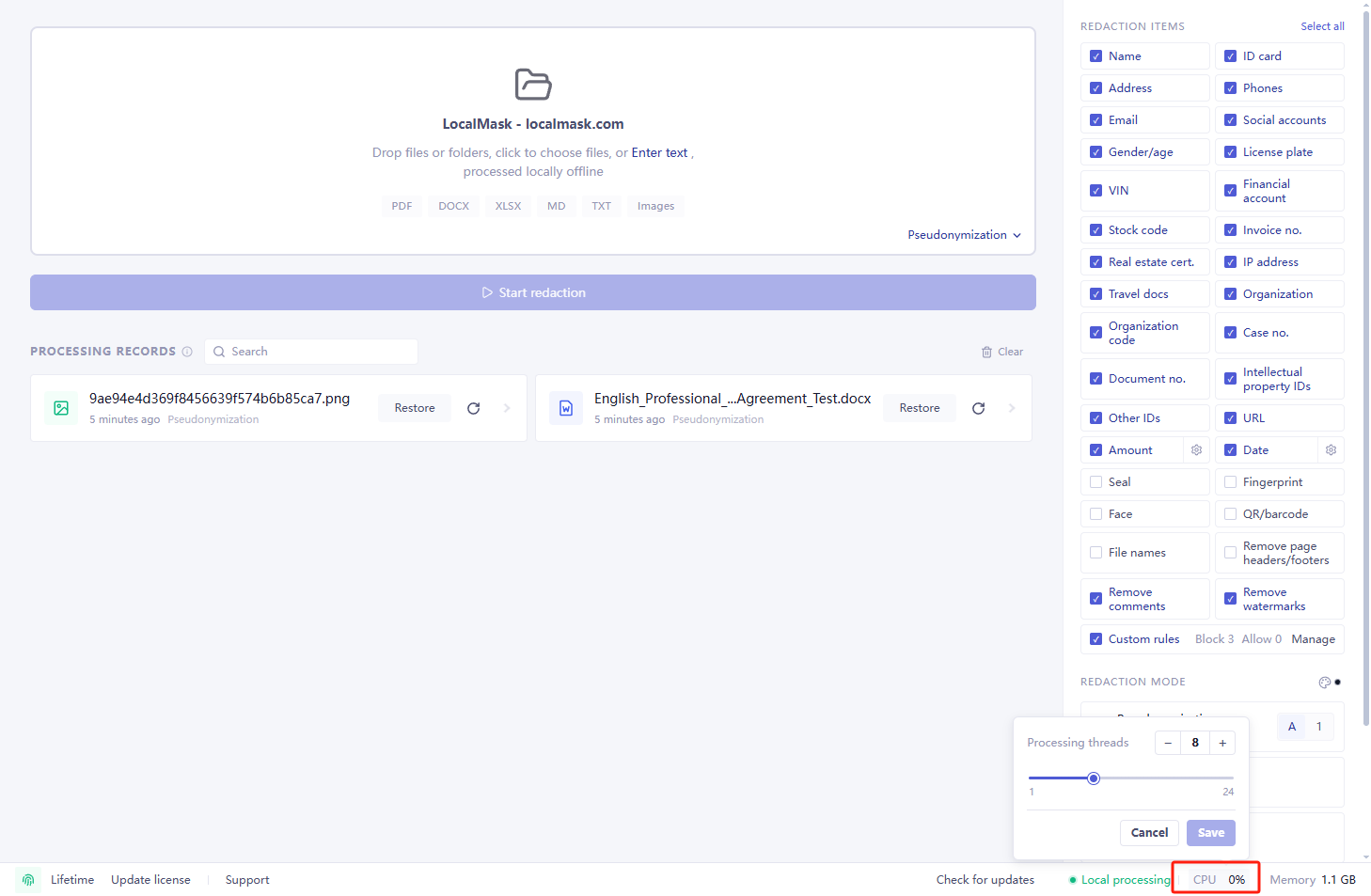
Click CPU in the bottom-right corner of the app to adjust the processing thread count. Devices with a graphics card can also enable GPU acceleration here by selecting the checkbox.
Large-document capability
LocalMask supports documents with thousands to around ten thousand pages. Processing time depends on the document and the device; use the tested scale and factors below as a reference.
LocalMask supports documents with thousands to around ten thousand pages. In internal testing, a 1,000-page document took about 3–4 minutes on the test device; a user processed a Word document of about 8,000 pages in over 40 minutes.
Actual time depends on hardware, file type, page complexity, scan quality, image count and the number of detected items.
We continue to improve large-document processing performance and the review experience.
Use cases
LocalMask serves sensitive workflows across legal, finance, risk, audit, healthcare, international trade, tendering, procurement, government and enterprise operations, with continuing improvements for professional material in each field.
LocalMask is currently used by legal departments at globally leading companies, law firms, banks, tax advisory firms and top-tier tertiary hospitals. It is also used in nonprofit programs and social work services. LocalMask is in use in 11 countries: China, the United States, Germany, the United Kingdom, India, Switzerland, Poland, Romania, Nigeria, Hungary and Liechtenstein.
Redact bank statements, accounts, card numbers, transaction details, credit material, audit workpapers, financial statements and compliance material before sharing, archiving or AI analysis.
Detect and redact relevant identifiers in patent applications, grant publications, work registrations and software copyrights before AI analysis, external collaboration or public circulation.
Detect and redact contacts, contact details, addresses, organization names and accounts in bilingual contracts, commercial invoices, packing lists, bills of lading, purchase orders and customer or supplier material before sharing, translation or AI processing.
Process sensitive information in internal reports, approval material, collaborative documents and archives before circulation.
Process employee records, resumes, compensation and performance data, invoices, reimbursements, payroll and financial spreadsheets.
Redact tender documents, bids, procurement files, supplier material, quotation tables and evaluation material before sharing, archiving, AI analysis or internal circulation.
Process sensitive information locally before submitting contracts, reports, screenshots, chat records or spreadsheets to AI.
Detect and redact names, ID numbers, contact details, medical record numbers, visit numbers, admission numbers and faces in health checks, medical records and diagnostic or laboratory reports before sharing or AI processing.
Complete local redaction and human review of mediation material, government documents and document batches before submission, collaboration or archiving, including on restricted networks.
Legal document redaction
Legal documents are a core training and continuous-improvement focus for LocalMask. The core Chinese entity recognition model is specifically trained on contracts, pleadings, case files, letters and evidence material, with an emphasis on names, organizations and addresses in complex contexts. Other detection capabilities cover identification numbers, contact details and case numbers.
LocalMask serves lawyers, law firms and in-house legal teams with clear requirements for detection accuracy, data locality and a complete processing workflow, including local detection, centralized review, content-level redaction, batch export and alias restoration. For cited statutes, regulations, official documents and other public material, the redaction scope of public authority names and official document numbers can be adjusted as needed to preserve the integrity and readability of the citation. Beyond legal material, it also supports sensitive workflows in finance, healthcare, tax, HR, international trade, procurement and government, with continuing improvements for different professional materials.
For example, in Pseudonymization mode, keep first-instance and appeal documents for the same case in one project. The same person or organization name retains the same alias across files, even when the party's role as plaintiff or defendant or the order of appearance changes.
Overall public evaluation results for the core Chinese entity recognition model: 98.25% strict entity-level F1 with 99.26% sensitive-information coverage on the full held-out test set, and 97.48% strict entity-level F1 with 99.04% coverage on the formal human-annotated benchmark. See Detection accuracy for the evaluation methodology.
Used by professionals from
- TPA Group Hungary
Tax advisory, auditing, accounting and payroll services in Hungary.
- Ontilo
A Polish advisory firm providing legal, tax, accounting, financial advisory and valuation services.
- Ochsner Consulting
A Liechtenstein consultancy offering governance, risk, compliance and training services for financial institutions and other businesses.
- Edward Waters University
A private university in Jacksonville, Florida.
- Rich Leadership
A New York firm providing executive coaching and leadership development programs.
- Rechtsanwälte Dr. Patsourakou
A law firm with offices in Germany and Greece, handling family law, cross-border disputes and other legal matters.
- The Elis LLC
Tax advisory, filing and governance services for churches, nonprofits and financial advisors.
- Kanzlei Anne Patsch
A German law practice specializing in medical law and criminal defense, including representation of healthcare professionals.
- AR Shaikh Advocates
An Indian legal practice handling criminal defense, family law and business law matters.
- Anwaltskanzlei Christof Egli (AKCE)
A Swiss law practice in Zollikon focusing on criminal law, alongside civil and administrative matters.
Security and privacy
Local processing and storage
All file processing runs offline on your computer. All file data and processing results are stored only on your computer.
- Source-file copies, detection results and review content within projects are stored locally in encrypted form.
- When exporting supported Word or PDF files, LocalMask processes identifiable document properties and metadata such as authors, comment authors and revision authors to reduce identity information left outside the main content.
Network access
Software update checks and downloads are initiated manually by the user. The application does not automatically check for updates online. When checking for updates, it requests the latest version information from the official website. When downloading updates, it retrieves installation packages over the network.
Personal licenses are activated offline on your computer. Enterprise customers can choose offline or online licensing. Online license verification connects to the licensing service.
How can I verify local processing?
The verification methods below are optional. These steps are not required for normal use of the software.
Whether your computer is online or offline, file detection and redaction run locally, and LocalMask does not upload your files or processing content. Follow the steps below to use your operating system's built-in network monitoring tools to view the application's network activity while it processes files.
View network activity on Windows
Windows includes Resource Monitor, which shows network activity by process without additional software. Keep your computer connected to the network and follow these steps:
- 01
Open LocalMask. Press Win + R, enter
resmonand press Enter to open Resource Monitor. - 02
On the CPU tab, find
localmask.exein the Processes list and select its checkbox. - 03
Switch to the Network tab, expand Network Activity and TCP Connections, and confirm that the tables are filtered by
localmask.exe. - 04
Import, detect, review and export a file in LocalMask while watching the filtered tables for sent and received data and remote addresses. Empty tables mean Resource Monitor is not currently showing corresponding network activity or connections for the selected process.
Processes without network activity may not appear in Processes with Network Activity, so select the process on the CPU tab first.
View network activity on macOS
macOS includes Activity Monitor, which shows data sent and received by each process. Keep your computer connected to the network and follow these steps:
- 01
Open LocalMask. Press Command + Space, then search for and open Activity Monitor.
- 02
Switch to the Network tab and search for “LocalMask” in the upper-right corner. For the Chinese edition, search for “零信脱敏”.
- 03
Check the Sent Bytes and Rcvd Bytes columns and note their values before processing a file.
- 04
Import, detect, review and export a file in LocalMask while watching whether the sent and received totals increase for the related processes.
Comparison with PDF editors
Ordinary PDF editors focus on manually annotating, covering or editing individual files.
LocalMask provides a complete workflow for detection, review, redaction, export and local restoration.
After visual covering, underlying text may remain copyable, searchable or extractable.
LocalMask emphasizes content-level redacted exports by processing text layers and image pixels.
Multiple files and pages require manual inspection one by one.
LocalMask batch-processes PDFs, Word documents, PPT and PPTX presentations, spreadsheets, CAD drawings (DWG / DXF), images, scans and text.
Blacking out everything can reduce the readability of the context.
Pseudonymization preserves relationships among people, organizations and addresses for AI analysis.
Processed items are scattered and difficult to verify consistently.
The workspace centralizes detected items, categories, source locations and export status.
Platform, installation and licensing
Go to the official download section and choose the installer for your computer. See System requirements for supported OS versions and memory requirements.
Install on Windows
- 01
Select “Download for Windows” on the website to download the Windows x64 installer.
- 02
Double-click the downloaded
.exefile, then follow the installation wizard to choose an installation location and complete the installation. - 03
Open LocalMask from the Start menu to reach the app home screen.
Install on macOS
- 01
Open the Apple menu and select “About This Mac” to check your chip. Choose the macOS Apple Silicon installer for an Apple chip or the macOS Intel installer for an Intel processor, then download it from the website.
- 02
Open the downloaded
.dmgfile and drag LocalMask into the Applications folder. - 03
Open LocalMask from Applications. On first launch, confirm opening the app when prompted by macOS to reach the app home screen.
System requirements
Windows 10 64-bit, x64, dual-core CPU with four threads and 4GB memory.
Windows 10/11 64-bit, quad-core CPU with eight threads and at least 8GB memory.
macOS 12 Monterey or later with 4GB memory.
At least 8GB memory; 16GB or more for large documents, high-resolution scans or many images.
Desktop Linux on x86_64 or ARM64 / aarch64, with at least 4GB memory recommended.
At least 8GB memory; validate the target distribution and desktop environment before procurement.
No dedicated GPU or CUDA is required.
Integrated graphics are sufficient.
Enterprise licensing
LocalMask supports silent deployment on Windows, macOS and Linux, along with enterprise batch deployment and centralized licensing for teams and organizations. Windows includes an MSI installer for centralized deployment, while macOS and Linux can be deployed through scripts or enterprise device management tools. Enterprise administrators can view license capacity and device status, approve device requests in batches, and disable or re-enable devices. When personnel leave or devices change, license capacity can be reclaimed and reassigned.
Continuous maintenance and issue response
LocalMask has delivered over 130 releases since launch and uses a rapid-iteration, continuous-delivery update model. Routine product issues are typically fixed, regression-tested and released within two business days after they are reported, without waiting for a scheduled major version.
Detection accuracy, professional-material support, document handling and usability continue to improve.
Check for and install updates in the app by selecting “Check for updates” at the bottom, without downloading and reinstalling from the website each time.
Frequently asked questions
Can I try LocalMask for free? What if I need more trial capacity or the results need improvement?
Yes. LocalMask includes a free trial after installation, and the entire trial can run offline. Enterprise customers and teams that need to evaluate more real-world business material can contact support to request additional trial capacity. Share concrete workflows and issues through support to help guide product improvements.
Can I use my licensed version permanently? Are there limits on processing runs or file count?
After purchasing a perpetual license, you can use your licensed version permanently, with no limit on processing runs or the number of files.
Does redaction require an internet connection?
No. Document import, detection, review, redaction, export and alias restoration run on your computer whether it is online or offline. You can also use LocalMask on an internal network.
Will my original files be uploaded?
No. LocalMask does not upload original files, detection results, project data, redaction settings or alias mappings to LocalMask or any third party.
Is LocalMask suitable before sending material to AI?
Yes. Redact and review documents in LocalMask before sharing them with AI tools such as ChatGPT, Claude and Gemini. Aliases in AI-generated reports can be restored to the original information locally.
Is LocalMask suitable for legal professionals?
Yes. LocalMask supports contracts, pleadings, case files, letters and evidence material. It detects sensitive information such as names, organizations, addresses, identification numbers, contact details and case numbers, then handles detection, review, redaction and export locally. LocalMask also supports other sensitive workflows in finance, healthcare, tax, international trade, procurement and government.
Is LocalMask specifically trained for legal documents?
Yes. The core Chinese entity recognition model is specifically trained and continuously improved for contracts, pleadings, case files, letters and evidence material, with an emphasis on names, organizations and addresses in complex legal contexts. LocalMask also covers professional identifiers such as case numbers.
When is LocalMask the better fit?
LocalMask is a strong fit when you need to process contracts, pleadings, case files, evidence material or other highly sensitive documents in professional work and value public accuracy metrics, fully local processing, human review, content-level redaction, batch handling, locally saved projects and alias restoration. It serves lawyers, law firms, in-house legal teams and professional workflows in finance, healthcare, tax, international trade, procurement and government.
Are projects saved automatically?
Yes. Results and review state are automatically encrypted and stored on the local computer. Open the corresponding project from Projects on the home screen to add files, continue reviewing, adjust and export.
Which files and materials are supported?
LocalMask supports PDF, Word (DOC / DOCX / WPS / RTF), PPT and PPTX presentations, Excel (XLSX / XLS / XLSM / ET), CSV, CAD drawings (DWG / DXF), TXT, Markdown, scans and images. Select multiple files or drag in a folder to process supported file types recursively.
Do images of credentials, contracts or similar documents embedded in Word or PDF files need to be extracted separately?
No. Import the Word or PDF file directly. LocalMask detects and processes both the images and text in the document, so there is no need to extract the images for separate processing.
Can LocalMask process file names, folder names, worksheet names, headers, footers and watermarks?
Yes. Redact file names, folder names and Excel worksheet names; optionally remove Word headers and footers, common PDF watermarks, and Word / PDF comments and annotations.
How accurate is detection?
The core Chinese entity recognition model achieves a strict entity-level F1 of 98.25% with 99.26% sensitive-information coverage on the full held-out test set, and a strict entity-level F1 of 97.48% with 99.04% coverage on the formal human-annotated benchmark. Actual results depend on file quality, layout and content.
Can a redacted export preserve the original layout?
A redacted copy in the original format preserves the main structure and layout. DOC, WPS and RTF files export as DOCX; XLS, XLSM and ET files export as XLSX. PPT and PPTX presentations are converted to PDF for review, and their redacted exports are PDFs. You can also export a PDF for viewing and archiving, a Word document formatted based on the original page layout, Markdown for AI analysis, or plain text as TXT.
Can LocalMask convert PDFs to Word offline?
Yes. Import a PDF, select “Extract text only”, then export the processed result as Word (DOCX). You can also redact the document before exporting it. Conversion runs entirely on your computer.
Can I turn off all redaction and only extract text from images or scanned PDFs?
Yes. LocalMask includes high-accuracy offline OCR. To recognize and extract text without redaction, click “Extract text only” in the top-right corner of the app.
What if a scanned PDF is too large to upload to an AI service?
Export redacted Markdown or Word (DOCX). Markdown is lighter and well suited to AI analysis; Word formatting is based on the original page layout. To reduce the size of a scanned PDF, select high compression during export for easier uploading and sharing.
How large a document can LocalMask process?
LocalMask supports documents with thousands to around ten thousand pages. In internal testing, a 1,000-page document took about 3–4 minutes on the test device; a user processed a Word document of about 8,000 pages in over 40 minutes. Actual time depends on hardware, file type, page complexity, scan quality, image count and the number of detected items.
Is LocalMask only adding a visual overlay?
LocalMask redacts selected sensitive content at the content level by processing the corresponding text layers and image pixels, then exports a redacted copy.
Is manual review still needed?
Yes. LocalMask assists with detection and redaction. Review detected items before export to confirm that the scope and output meet your requirements.
How can seals be redacted?
Open the settings next to Seals to choose “Redact the entire seal”, “Redact seal text only” or “Erase seal”. Redacting seal text keeps its border and graphics; erasing a seal preserves overlapping text. Review the result before export.
Can LocalMask process scanned PDFs, rotated images and handwritten signatures?
Yes. LocalMask can process scans, image-only PDFs, images with common rotations and handwritten signatures. Low resolution, complex backgrounds, skew, distortion and handwriting can affect detection.
Can LocalMask handle PDF, Word and Excel files that require a password to open?
Yes. Enter the correct password to redact the file locally. Passwords are verified and used locally.
What is the difference between an annotated Word copy and a redacted copy?
The redacted copy is for final delivery. The annotated copy is for internal review only: it retains sensitive source text and uses highlights and comments to identify it, so it must not be shared as a redacted result.
How can I review Excel files?
Review and adjust detected results, or select a column letter to redact or ignore the entire column. You can also search a workbook, worksheet or selected column using keywords or regular expressions, then batch redact matches. Ignoring a column adjusts results after recognition has finished. In Pseudonymization mode, aliases in Excel and CSV files can also be restored locally.
Can I specify Excel column names in advance to skip recognition and speed up processing?
Yes. Before processing large Excel or CSV spreadsheets, select Spreadsheet rules → Match whole columns in Custom Rules on the home screen. Add columns that all need redaction to the blocklist and choose a label: data below the header is redacted directly, skipping content recognition to save recognition time. Add columns that need no redaction to the allowlist to preserve original values and skip content recognition. Unmatched columns continue through automatic recognition. Changes to Match whole columns rules in a project apply to files added later. See column redaction and speedup for large Excel / CSV spreadsheets
Which custom rules are supported?
LocalMask supports text, spreadsheet and visual rules. Text rules apply to all supported file types; spreadsheet rules apply only to Excel / CSV. Content and headers support fixed text, wildcards and regular expressions. Content matching a blocklist rule is redacted; content matching an allowlist rule is not redacted. Spreadsheet rules can match cell content, restrict matching to columns by header, or match whole columns. Text rules can also specify replacement aliases. Add a selected logo, icon or other distinctive graphic to the blocklist to automatically match and redact it in future files.
What should I do if different document types need different rules?
A project can contain spreadsheets, Word documents, PDFs and other files with shared aliases. Text rules apply to all supported file types. Spreadsheet rules apply only to Excel / CSV and can match cell content, restrict matching to specified columns, or match whole columns. Add subsequent materials to the same project to automatically reuse its rules and aliases. Rules can also be exported and imported for refinement and sharing. See spreadsheet rule examples
Does LocalMask support pseudonymization and restoration?
Yes. LocalMask uses consistent aliases to pseudonymize sensitive information while preserving context. Pseudonymization can also automatically associate recognized names of the same organization, such as abbreviations and former names, so they are not mistaken for separate entities after redaction. When AI or another external service returns text or a file containing those aliases, restore it locally.
Can aliases be restored in a different AI-generated document?
Yes. Alias restoration uses the alias mapping and does not compare the output with the original file. AI or another system may return content with a different structure, layout or supported file type. As long as recognizable aliases remain, restore them locally using the original project or an exported alias table. Word documents returned with tracked changes or comments can retain them while restoring aliases, original headers, footers, logos and watermarks.
Website content use notice
This website content is provided for understanding LocalMask's product purpose, feature scope, download entry, purchase entry and usage boundary. Product screenshots, interface design, copy, graphics, brand assets and page structure may not be used to train, fine-tune, retrieve, generate, reproduce or adapt competing products, similar software interfaces, marketing pages or derivative designs without explicit permission from Nanjing Lingxin Technology Co., Ltd.