
Import files or folders
Drop files or an entire folder to scan supported formats in that folder and its subfolders.
Local offline redaction software
Built-in offline OCR and sensitive information detection, with content-level redaction of text layers and image pixels.
Redact and anonymize PDFs, Word files, Excel files, CSV files, images, scans and text on your computer. Keep useful context with aliases, review every hit, then export a clean copy. Required offline detection models are built in, with no separate model download or installation. Files stay on your computer, and processing works offline.
Common workflows
LocalMask is used by legal departments, law firms, banks, tax advisory firms, hospitals and professionals handling sensitive records. It is also used in nonprofit programs and social work services. LocalMask is in use in 11 countries: China, the United States, Germany, the United Kingdom, India, Switzerland, Poland, Romania, Nigeria, Hungary and Liechtenstein.
11 countries
Redaction and alias restoration both run offline on your computer. The LocalMask software does not provide AI services or send files to any AI platform.
Project-based review workspace
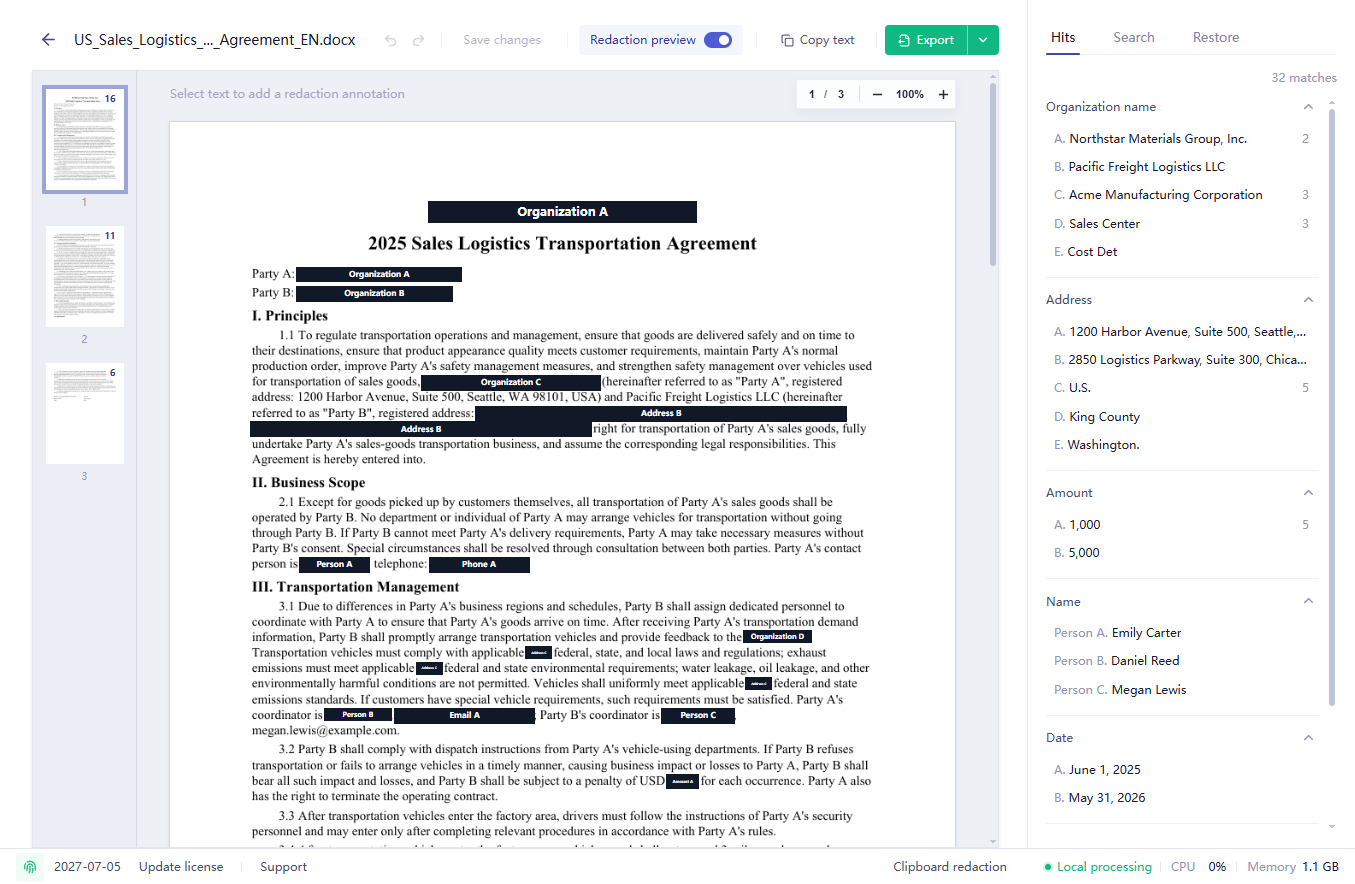
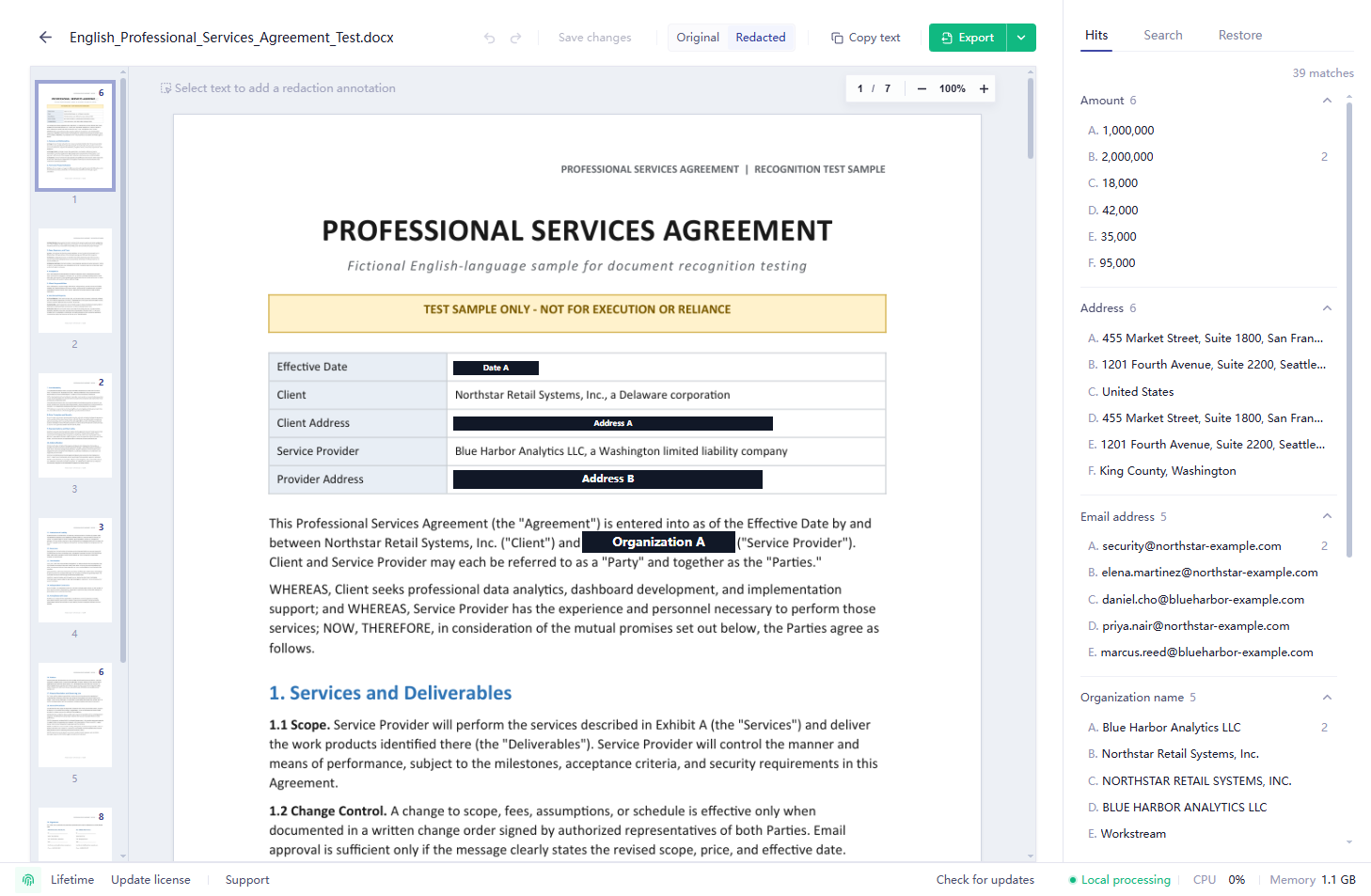
Review hits beside the original layout, navigate multi-page files with thumbnails, preview the redacted result and export in the format that fits the next handoff.
Drop files or an entire folder to scan supported formats in that folder and its subfolders.
Select names, contact details, case numbers, organizations and other categories, then assign pseudonymization, full masking, removal or partial masking.
Review detected entities, search with plain text or regular expressions, and batch annotate search results. You can also batch-mark the same text or graphic.
Export a redacted copy in the original format, PDF, Word, Markdown or TXT. Lightweight Markdown is especially useful for AI analysis.
When AI or another service returns text, DOCX, TXT or Markdown containing aliases, restore the original values on your computer.
Redaction modes
LocalMask applies content-level redaction to text layers and image pixels, then exports redacted copies of your files. LocalMask can preserve context through pseudonymization, obscure part of a value, mask it completely, or remove it while leaving blank space. Redaction-area colors can also be customized.
The system automatically assigns aliases such as Person A, Person 1, Company A or Company 1 to sensitive content, and custom rules can specify replacement aliases. Pseudonymization keeps relationships among people, organizations and addresses readable and can automatically associate recognized names of the same organization, such as abbreviations and former names, so they are not mistaken for separate entities after redaction. Matching content uses the same alias across files within a project, and newly added files reuse existing aliases. When creating a project, you can reuse aliases from a previous project or import an exported alias table.
Mask the full detected value when exported material should not expose readable source text.
Replace the detected content with blank space when the output should look closer to manual removal.
Keep a few characters for manual review based on the information type and mask the rest of IDs, accounts or phone numbers.
Detection coverage
Detect common sensitive information across English and Chinese documents, including identity, contact, organization, case, financial and visual targets. Add fixed text, wildcard, regular-expression or visual rules for business-specific content.
Custom rules
The software automatically detects most common sensitive information; custom rules supplement matching with fixed text, wildcards, regular expressions and graphic matching. Text rules apply to all supported file types. Spreadsheet rules apply only to Excel / CSV and can match cell content, restrict matching by header, or match whole columns. Whole-column rules redact columns directly or skip content recognition to speed up large spreadsheets. Custom text rules can also specify replacement aliases.
Matches text identical to the entered content.
Use * between fixed text to stand for any content.
Uses a regular expression to match content in a specific format.
Add a selected logo, icon or other distinctive graphic to the blocklist to automatically match and redact it in future files.
Why not just use a PDF editor or PII framework?
LocalMask is designed for people who need a usable redaction workspace: import, detect, review, alias, export and restore AI output from the local mapping.
Download
Download LocalMask for Windows or macOS, or contact support for Linux. A license is required for activation after purchase.
No. Document import, detection, review, redaction, export and alias restoration run on your computer whether it is online or offline. You can also use LocalMask on an internal network.
No. LocalMask includes the required offline models and is ready to use after installation. No separate internet download or model installation is required, and document detection and redaction run locally.
Yes. Document import, detection, review, redaction, export and alias restoration run on the local computer and can be used on an internal network, in a no-public-internet environment or offline.
No. LocalMask does not send original files, detection results, review decisions, project data or alias mappings to servers operated by LocalMask or any third party. These data stay in your local workspace. View verification steps
LocalMask supports Windows x64, macOS Apple Silicon, macOS Intel, Linux amd64 and Linux ARM64. Windows 10 64-bit or later is recommended. On macOS, use macOS 12 Monterey or later. Contact support to request a Linux build for your environment.
LocalMask supports PDFs, Word documents (DOC, DOCX, WPS and RTF), PPT and PPTX presentations, Excel files (XLSX, XLS, XLSM, ET), CSV files, CAD drawings (DWG and DXF), TXT, Markdown, screenshots, scanned pages, image-based PDFs and images.
No. Import the Word or PDF file directly. LocalMask detects and processes both the images and text in the document, so there is no need to extract the images for separate processing.
Yes. LocalMask can detect handwritten signatures in PDFs, scans, images and Word documents. Results vary with image clarity, background, handwriting and page layout.
Yes. LocalMask detects common sensitive information in English and Chinese material, including names, email addresses, phone numbers, URLs, addresses, postal codes, organizations, business identifiers, accounts, amounts and dates.
Yes. Enter the correct password to redact the file locally. Passwords are verified and used locally.
Yes. Detect and redact sensitive information locally, then export redacted Markdown, Word or another format for analysis in AI tools such as ChatGPT, Claude and Gemini. Stable aliases replace direct identifiers while preserving context, and aliases in AI output can be restored locally when needed.
Yes. LocalMask supports contracts, pleadings, case files, letters and evidence material. It detects sensitive information such as names, organizations, addresses, identification numbers, contact details and case numbers, then handles detection, review, redaction and export locally. LocalMask also supports other sensitive workflows in finance, healthcare, tax, international trade, procurement and government.
LocalMask is a strong fit when you need to process contracts, pleadings, case files, evidence material or other highly sensitive documents and value fully local processing, human review, content-level redaction, batch handling, locally saved projects and alias restoration. It serves lawyers, law firms, in-house legal teams and professional workflows in finance, healthcare, tax, international trade, procurement and government.
A redacted copy in the original format aims to preserve the main structure and layout. DOC, WPS and RTF files export as DOCX; XLS, XLSM and ET files export as XLSX. PPT and PPTX presentations are converted to PDF for review, and their redacted exports are PDFs. You can also export a PDF for viewing and archiving, an editable Word document for AI uploads, Markdown for AI analysis, or plain text as TXT.
Yes. LocalMask includes high-accuracy offline OCR. To recognize and extract text without redaction, click “Extract text only” in the top-right corner of the app.
Export redacted Markdown or Word (DOCX). Markdown is lighter and well suited to AI analysis; choose DOCX when you need to continue editing in Word. Both are usually easier to upload and process than the original scanned PDF.
Yes. The review workspace shows page thumbnails for multi-page documents, so you can navigate quickly and verify redaction in the original page layout.
Yes. LocalMask is designed for documents with thousands of pages. Processing time depends on hardware, file type, page complexity, scan quality, image count and the number of detected items.
Yes. LocalMask handles common page rotations in images and scanned documents.
No. LocalMask focuses on content-level redaction for exported copies, processing text layers and image pixels instead of only drawing a visible box on top of the page.
Yes. LocalMask can clean common watermarks, comments and annotations.
Yes. LocalMask supports XLSX, XLS, XLSM, ET and CSV files for local detection, review and redacted export. For common spreadsheet headers, LocalMask combines the header and column content to assist automatic detection. Spreadsheet rules can match cell content, restrict matching by header, or match whole columns. Whole-column rules redact columns directly or skip content recognition, speeding up large, consistently structured spreadsheets. During review, select a column letter to choose a label and redact or ignore the entire column. You can also search a workbook, worksheet or selected column using keywords or regular expressions, then batch redact matches. Aliases created in Pseudonymization mode can also be restored locally in Excel and CSV files.
Text rules apply to all supported file types. Spreadsheet rules apply only to Excel / CSV. Content and headers support fixed text, wildcards and regular expressions. Visual rules are also supported. Content matching a blocklist rule is redacted; content matching an allowlist rule is not redacted. Spreadsheet rules can match cell content, restrict matching by header, or match whole columns. Text rules can also specify replacement aliases. Add a selected logo, icon or other distinctive graphic to the blocklist to automatically match and redact it in future files.
Yes. The system automatically assigns aliases such as Person A, Person 1, Company A or Company 1 to sensitive content, and custom rules can specify replacement aliases. Pseudonymization keeps relationships among people, organizations and addresses readable and can automatically associate recognized names of the same organization, such as abbreviations and former names, so they are not mistaken for separate entities after redaction. Matching content uses the same alias across files within a project, and newly added files reuse existing aliases. When creating a project, you can reuse aliases from a previous project or import an exported alias table. AI-generated text containing those aliases can be restored on your computer.
LocalMask automatically detects sensitive information, brings every hit into one review workspace and exports content-level redacted copies. Manual editors are better suited to finding and covering individual items one at a time, while online tools require sending material to a remote service.
Yes. LocalMask assists with detection and redaction, but users should review matches before export to confirm the redaction scope and final output meet their use case.
Yes. LocalMask includes a free trial after installation, and the entire trial can run offline. Enterprise customers and teams that need to evaluate more real-world business material can contact support to request additional trial capacity. Share concrete workflows and issues through support to help guide product improvements.
Enterprise licensing can be adjusted as usage needs change. Contact support to discuss licensing, device changes and deployment details.
Yes. Purchases include one year of version updates. LocalMask uses a rapid-iteration, continuous-delivery update model. Report product issues or suggestions through website support. Routine product issues are typically fixed, regression-tested and released within two business days.
After installing LocalMask, click “Activate” in the bottom-left corner of the app to view and copy your machine code.
A single-device lifetime license costs $99, and a two-device lifetime license costs $179, before taxes calculated at checkout. Both include 1 year of version updates and continued use of licensed versions. Enter each device's machine code to receive its license key by email after payment confirmation. For devices without a machine code, save your order number and contact support to activate.